
Teams Phone is a strong fit for Microsoft-centered organizations. Here is what the migration actually involves, phase by phase.
Every organization I talk to has a plan for replacing its phone system. Not always a written plan, or even a plan anyone is especially excited to look at. More often it is an unspoken agreement that the current setup works well enough until the day it does not, and that one person in IT knows exactly which button not to press. Maybe it is an old PBX sitting somewhere nobody likes to visit. Maybe it is a cloud phone platform bolted onto the rest of the business. Maybe it is a collection of numbers, queues, auto attendants, shared voicemail boxes, and routing decisions that made perfect sense in 2017 and now appear to have been designed by a raccoon with administrator access.
Eventually someone asks the reasonable question: should we move this to Microsoft Teams Phone? That is usually when the conversation gets noisy:
Someone raises licensing, someone else compares it to Zoom Phone, and within about ten minutes you are fielding questions about E911, an ancient fax line, and whatever a vendor said about AI last quarter. Meanwhile the networking person is wondering whether call quality has ever been documented by anyone other than “I think it is fine.”
All of those questions matter. But the answer underneath them is simpler than the noise suggests: Teams Phone is a strong platform, particularly for organizations already running on Microsoft 365.
| Not sure you are there yet? Learn more about the 5 Signs Your Business Phone System is Due for an Upgrade, then come back here to scope the move. |
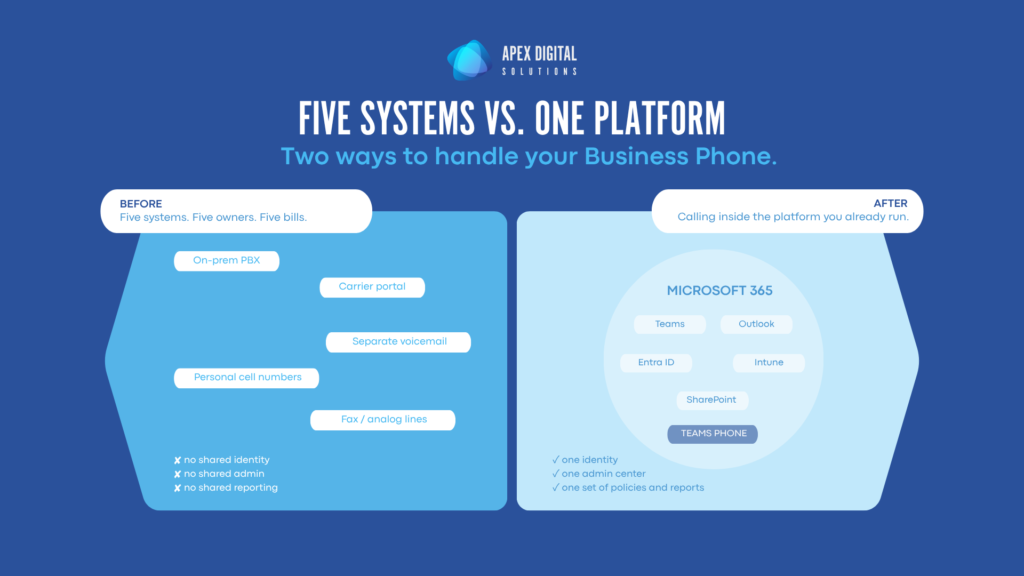
For organizations that already spend their day in Outlook, Teams, SharePoint, OneDrive, calendars, meetings, chat, files, Entra ID, Intune, and the rest of Microsoft 365, Teams Phone can bring business calling into the same operating model. Calls, meetings, chat, voicemail, presence, identity, administration, policies, devices, reporting, and support do not have to live in separate worlds. That matters because work does not happen in neat tool-shaped boxes. A customer call turns into a Teams message, which turns into a meeting, which ends with someone reviewing a file and assigning a follow-up. A phone system that fits that pattern has a practical advantage over one that sits outside it.
Teams Phone can reduce platform sprawl, simplify administration, support hybrid and mobile users, and make voice part of a broader Microsoft 365 strategy instead of a separate island with its own rules, tools, and mysteries. That does not mean every organization should blindly collapse everything into Microsoft because the logo matches. That is how people end up with strategy by sticker collection. But if Microsoft 365 is already where your users work and where your IT team manages identity, devices, security, and collaboration, Teams Phone deserves a serious look. In the right environment it does more than replace dial tone. It makes calling part of the same platform your business already runs on.
A strong platform still needs a migration plan
Here is where I ruin the magic trick. Teams Phone is a good platform, and it will not do the work for you. No phone system automatically fixes years of undocumented call flows, mystery numbers, unclear ownership, holiday routing nobody remembers, or the fax lines that have survived every modernization project like tiny analog cockroaches.
That is not a criticism of Teams Phone; it is how phone systems work. Voice environments are full of business logic, and the technology is the smaller half of it. The rest is how the organization communicates: who answers what, what happens when they do not, and who owns the experience after go-live.
The organizations that get the most out of Teams Phone are the ones that pair it with clean inventory, deliberate design, realistic testing, and a clear owner after launch. The seven phases below are what that looks like in practice.
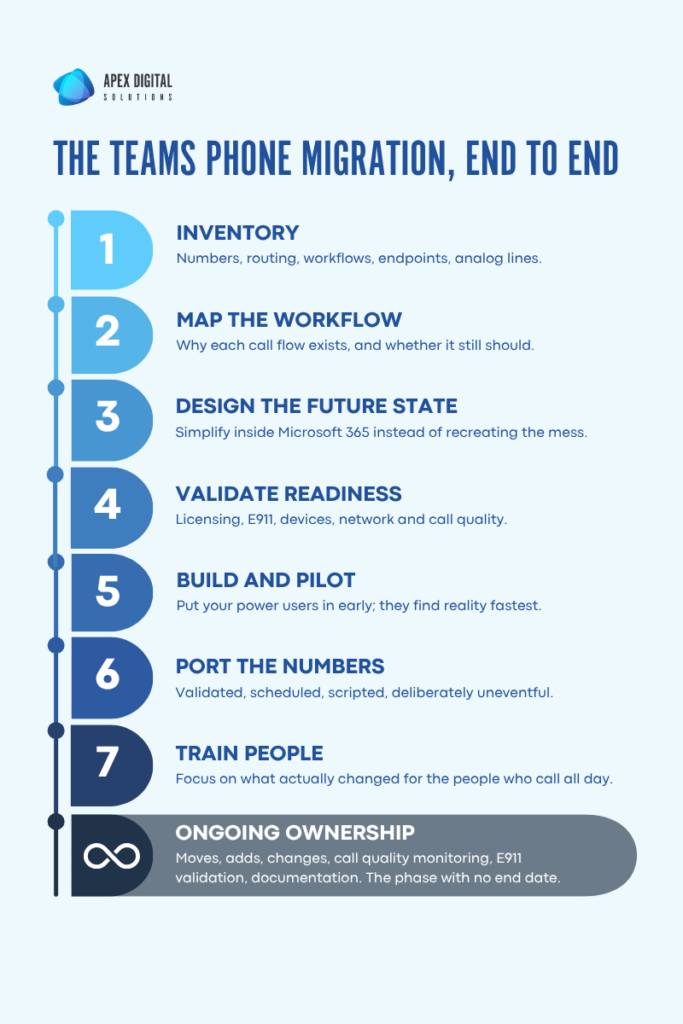
Phase 1: Inventory what you have before you move what you have
The first step in a Teams Phone migration is inventory, not licensing. This is the phase that determines whether the rest of the project stays calm or starts collecting expensive surprises.
Few organizations have a clean, current answer to the phone-specific questions that matter. How many numbers do you own? Which ones are active? Which ones are assigned to users? Which ones point to departments, queues, shared lines, alarms, fax services, or that one conference room nobody has booked since 2020?
Here is what you need to have inventoried:
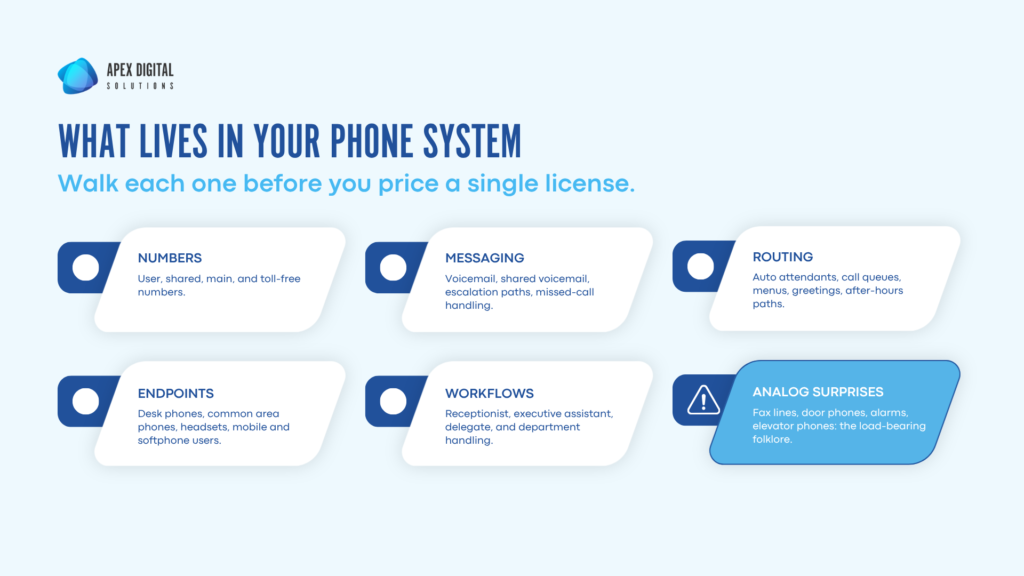
This work is not glamorous, but it is where you find the things that will matter later. Phone systems tend to collect exceptions. Someone solved a problem years ago, then someone solved another problem around it, then someone retired, and now everyone is afraid to remove the routing rule because it might be load-bearing.
Inventory is how you separate what is still necessary from what is just folklore.
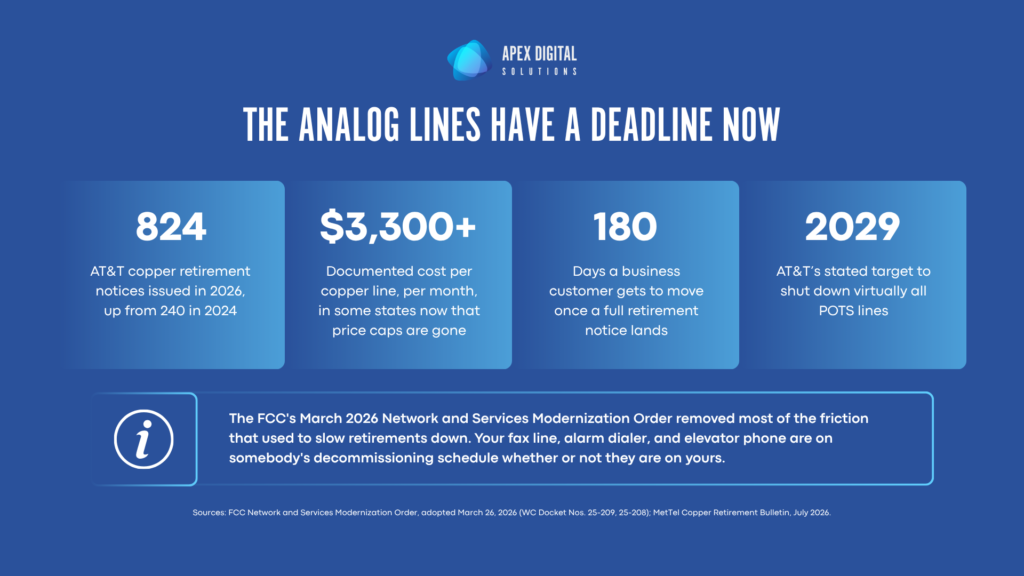
| If you have not done this exercise yet, start there. Our Phone System Audit Guide is a 15-minute self-assessment that captures your system, users, sites, age, and all-in monthly cost, then scores reliability, integration, and ownership out of 30. It also flags the copper and POTS lines that carriers are actively retiring, which is usually where the fax, alarm, and elevator surprises turn up. |
Phase 2: Map the business workflow, not just the telephone features
Once the inventory is clear, map how the organization actually uses calling. That is a different exercise from documenting the current system: the system tells you what exists, while workflow mapping tells you why it exists and whether it still should.
A receptionist workflow is different from a support queue. A sales team is different from a clinic, a hotline, or a field service team. An executive assistant handling calls for leadership is different from an after-hours emergency path. If you treat all of those as just ‘phone numbers,’ you will miss the business logic that makes the system useful.
This is why the best migration conversations are less about features and more about outcomes. Who needs to answer? What happens if they do not? When should calls overflow? Who owns routing changes? What happens on holidays? What happens when someone leaves? What happens when the internet, power, or a carrier has a bad day?
Phase 3: Design the future state with Microsoft 365 in mind
One of the advantages of moving to Teams Phone is that it gives you permission to rethink the phone experience as part of the broader Microsoft environment. You do not have to drag every old decision into the new platform just because it exists. Sometimes the old system is a perfect reflection of the business. Sometimes it is a sedimentary record of every urgent request IT has received since 2015.
The design phase is where you simplify. That might mean consolidating auto attendants and cleaning up call queues, or giving users softphones instead of defaulting to desk phones, or finally getting business calls off personal cell numbers. For most organizations it means all of the above, plus a reporting cadence that keeps the system healthy after launch.
The important thing is to design intentionally. If you recreate the old mess in a new platform, what you have is not modernization. It is historical preservation with a new admin center.
Phase 4: Validate licensing, emergency calling, devices, and readiness
Teams Phone sits inside the Microsoft ecosystem, which is a major strength, but it also means the underlying environment matters. Users need the right licensing. Calling policies need to be planned. Emergency calling needs to be configured and maintained correctly. Devices need to be selected and tested. Network readiness and call quality need attention before users start blaming Teams for problems the old system had too.
This is also the moment to decide which physical phones still matter. Some people need a handset, some common areas need a shared device, and plenty of roles are better served by a headset and the Teams app. Let the workflow decide, not nostalgia.
Emergency calling needs its own workstream.
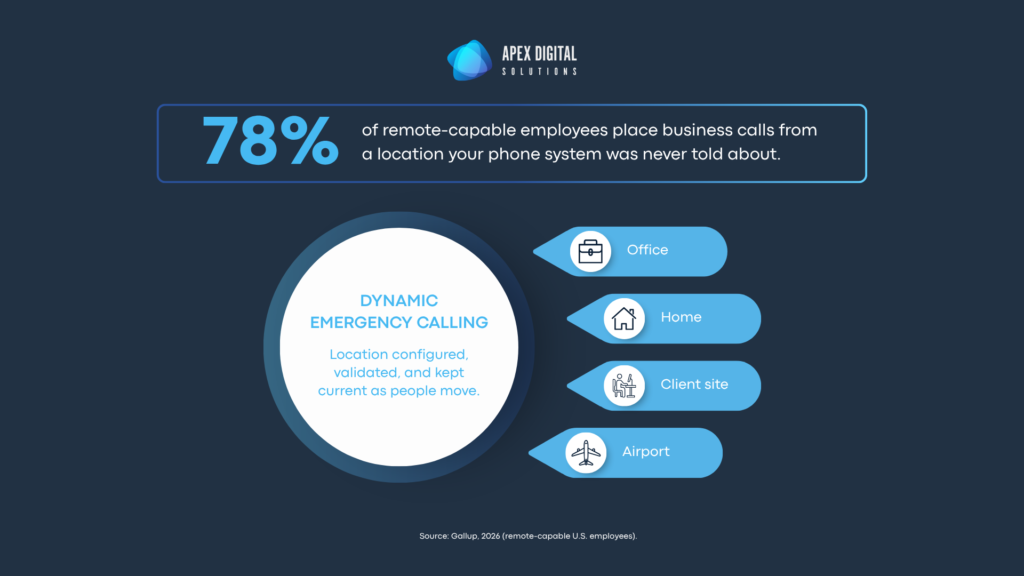
Old phone systems assumed the caller was sitting at a known desk in a known building, and hybrid work broke that assumption completely. If your people can place business calls from home, a client site, or an airport, you need a documented plan for how E911 location data is configured, validated, and kept current as people move. This is the single most common gap we find in Teams Phone deployments that were rushed.
Phase 5: Build, pilot, and let real users find reality
By the time numbers start moving, the boring work should already be done. Call flows should be built. Users should be assigned. Devices should be tested. Help desk staff should know what questions they are about to get. The handful of people who use the phone system in oddly specific ways should be part of the pilot, not introduced to the project on go-live morning.
Every organization has at least one person who knows the phone system better than the documentation does. Usually it is the receptionist, an executive assistant, a department coordinator, or the support lead who can tell from the ring pattern whether the call came in on the main line, the back line, or the secret line nobody admits exists.
Put those people in the pilot. Not because they are difficult, but because they will find reality faster than anyone else. If something is confusing, clunky, or wrong, they will know immediately. That is exactly what you want before the whole organization depends on it.
Phase 6: Port the numbers and keep the drama low
Number porting is the part everyone worries about, and understandably so. The number is the front door. If the front door disappears, people notice.
A good porting plan is engineered to be uneventful. You validate the existing numbers and confirm who actually owns them with the losing carrier, you schedule cutover timing around business hours, and you have the call flows built and the test script written before the port window opens. The goal is not a dramatic launch. The goal is that customers keep dialing the same numbers while the business answers them in a better-managed system.
In the best version of this project, go-live day is almost disappointingly ordinary. Calls come in. People answer them. Voicemail works. Nobody has to sprint to a network closet. Nobody says, ‘Maybe restart the PBX?’ while looking at a box old enough to rent a car.
Phase 7: Train people on what actually changes
A major mistake is assuming the technology is obvious because it lives in Teams. For some users, it will be obvious. For others, this is the first time their phone experience has changed in years. A little practical training goes a long way, especially for high-volume call handlers and anyone responsible for routing or customer-facing workflows.
If the organization is moving away from desk phones for many users, say that clearly. If mobile calling through Teams is part of the plan, explain what that means. If business calls should no longer be handled through personal cell numbers, make the new process easy enough that people actually follow it.
The migration is not the finish line
After go-live, somebody still has to own the platform. New hires need numbers. Departing users need to be cleaned up. Call queues need changes. Holidays need routing updates. Departments reorganize. Offices move. Executives change assistants. Someone wants a new main number for an initiative that may or may not exist in six months.
There is also the ongoing operational work that makes voice reliable: monitoring call quality, watching usage patterns, reviewing missed calls, managing carrier issues, validating emergency calling, keeping documentation current, and making sure the system does not slowly become the same kind of mystery everyone just migrated away from.
| A phone system nobody owns after go-live is not modernized. It is newly neglected. If your team does not have the capacity to carry that work, this is exactly what our Managed Business Phone System service covers: day-two administration, call quality monitoring, E911 validation, and the routing changes that never stop coming. |
So what does moving to Teams Phone actually look like?
Less like flipping a switch, more like modernizing a business process that happens to involve telephones. You inventory what exists and map how people actually work, then simplify whatever no longer makes sense. You validate licensing, devices, emergency calling, and network readiness before you build, and you test with the users who will find the problems fastest. You port the numbers carefully and train people on the parts that changed. Then you operate the platform with the same discipline you apply to anything else the business depends on.
The organizations that get this right are not the ones that obsess over the feature list first. They are the ones that ask better questions. What are we trying to make easier? What risk are we trying to reduce? What can we stop maintaining? What should IT no longer have to manually babysit? What value do we unlock by bringing calling into the same Microsoft environment where our people already work?
When Teams Phone is the right fit, the outcome feels surprisingly normal. People call and people answer. Customers reach the right place on the first try. IT has real control and leadership has real visibility, and the business has one less aging, awkward, strangely emotional system to worry about.
The realistic takeaway
Teams Phone fits a lot of organizations well, because it brings business calling into the Microsoft environment where the work is already happening. It reduces platform sprawl, simplifies administration, and makes voice part of your Microsoft 365 strategy rather than a separate island with its own rules and its own mysteries.
None of that removes the need for good execution. The platform still rewards the unglamorous work: inventory, workflow mapping, call-flow design, readiness validation, pilot testing, training, documentation, and someone owning it on day two.
Do that work, and Teams Phone stops being a product conversation and becomes what it should be: a practical, integrated way to keep the business talking without making the phone system the main character.
Which is good, because nobody asked for the phone system to have a personality.