
Phone system upgrades are easy to push aside because they rarely feel urgent. Legacy phones may be clunky, but if the call still goes through and voicemails keep routing, it can be easy to push off upgrading while you handle the projects with clearer business impact or more urgent deadlines.
But over time the challenges pile up:
- A remote hire waits a week for a working extension.
- You hear secondhand that a customer tried calling three times before giving up and emailing instead
- Finance asks why the maintenance contract went up again.
Individually, each one is easy to absorb, so none of it gets escalated. Collectively, it is the reason your team spends more time working around the phones than working with them.
That is how phone systems usually go.
They rarely fail outright: Instead they degrade in ways that are easy to ignore until you add up the support hours, the missed calls, and the workarounds your team has quietly built to compensate for what the system no longer does well.
If you are weighing whether yours has reached that point, here are five signs that it has. Each one comes with the operational tells to look for and what to check in your own setup.
The five signs your business phone system is aging:
- Call quality is slipping
- Routine changes take days to make
- Remote and hybrid staff cannot use it properly
- It does not connect to Teams, your CRM, or your reporting
- Carrier and maintenance costs keep climbing, and copper is on the way out
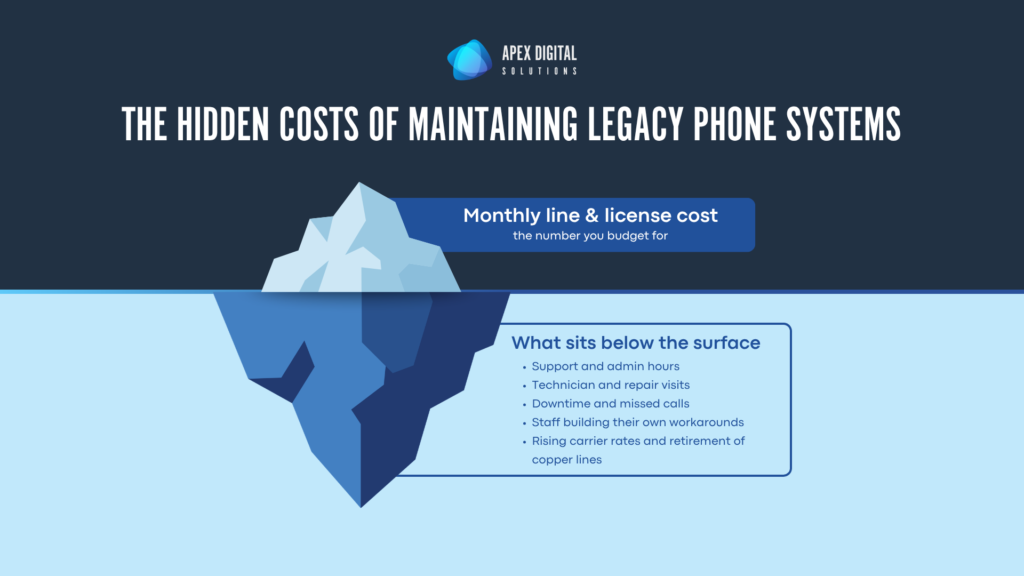
Before the detailed list, it helps to see why a system that still works can lose its edge as it ages. The monthly bill is the part you budget for. The larger cost sits under the surface.
Sign 1: Call quality is slipping
If people are apologizing for the connection before a call even starts (dropped audio, static, a voice that breaks up mid-sentence) the system is already costing you. Degrading audio usually traces back to aging hardware, strained bandwidth, or a setup that was never designed for how your team works today.
For an IT or operations leader, the trouble is that each incident looks minor in isolation. Put them together and you have a customer experience problem.
What to look for:
- Help desk tickets tagged to phones or audio creeping up month over month
- Complaints that cluster at the same times of day, which often points to bandwidth contention
- Rising jitter, latency, or packet loss on your monitoring, if you can even see those metrics today
- Calls that fail on transfer or conference rather than on the first connection
| The customer cost About 78 percent of consumers will abandon a purchase after poor service, and a customer who has a bad experience is roughly four times more likely to switch to a competitor. (Zendesk) |
Sign 2: Routine changes take days to make
Setting up a new hire on the phones should take minutes. On an older system it often means ordering hardware, scheduling a technician, and waiting before that person can take a call. Moving an extension, changing call routing, or opening a new location turns into a small project with its own lead time. For a growing business, that lag becomes a tax on every change you make.
The gap is easiest to see when you put the two approaches side by side.
| Routine task | Aging on-site system | Modern cloud system |
| Add a new user | Route wiring, provision hardware, schedule a tech | Ship a headset or speaker, activate from a web portal |
| Open a new location | New lines and on-site hardware | Assign numbers remotely, same day |
| Change call routing | Vendor ticket and scheduling | Self-serve, takes effect immediately |
Sign 3: Remote and hybrid staff cannot use it properly
If your remote and hybrid employees are giving out personal cell numbers, forwarding calls to themselves, or running a separate app to stay reachable, the phone system has stopped serving a large part of your workforce.
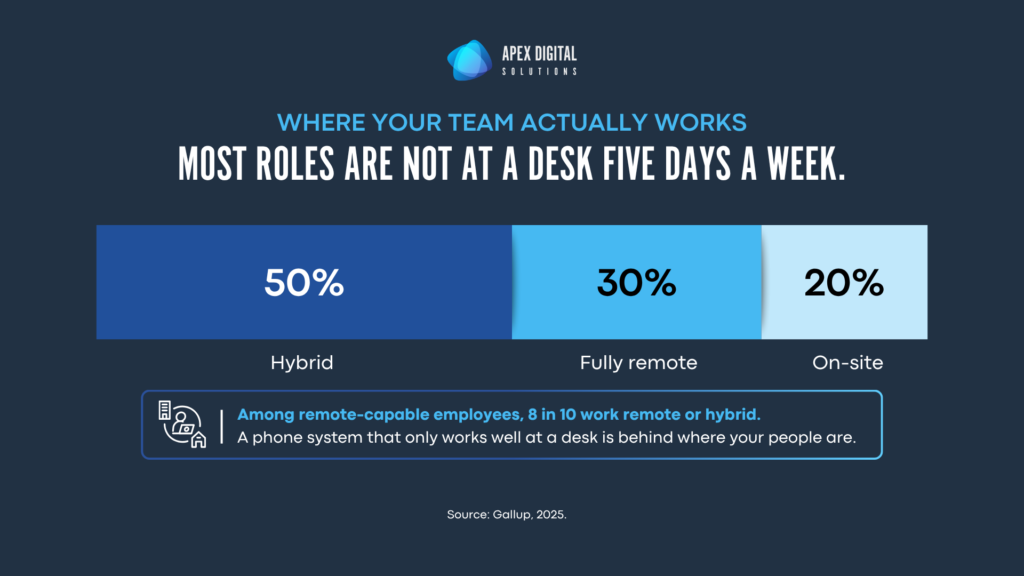
That matters more every year, because the workforce has moved. Among remote-capable employees, about eight in ten now work hybrid or fully remote. (Gallup)
The workarounds that signal the problem:
- Staff handing out personal mobile numbers so clients can reach them
- Call-forwarding chains that nobody fully understands or maintains
- A second app running alongside the phone system to cover what it cannot do
- Voicemails sitting unheard on a desk phone because the person is rarely at that desk
Beyond the daily friction, those workarounds scatter business calls across personal devices and apps you do not control, which creates security and continuity exposure you would not accept anywhere else in your stack.
The E911 problem
Remote and hybrid work also raises a compliance issue many teams underestimate.
Under Kari’s Law and RAY BAUM’s Act, organizations using multi-line phone systems must support direct 911 dialing, internal notification when 911 is called, and dispatchable location information that helps emergency responders find the caller.
In practice, that means the system must help answer three questions quickly:
- Where is the caller?
- Is the call routed to the right public safety answering point?
- Did the right internal team get alerted so they can guide first responders when they arrive?
When that chain breaks, the consequences can move quickly and cause physical risk: emergency calls may be delayed or misrouted, responders may arrive without enough location detail, and the organization may face legal exposure, FCC enforcement, or liability if the phone system slows emergency response.
Turn phone system frustration into a clear upgrade decision
Our Phone System Audit Guide walks you through what you have, how it is performing, and what it costs to keep running, then gives you a score and a recommended next step.
Sign 4: Phone system does not connect to Teams, your CRM, or your reporting
A phone system that doesn’t talk to anything else creates double work everywhere it touches. When it does not connect to Microsoft Teams, your CRM, or your helpdesk, your team pays for it in copy and paste, missed context, and call notes that never make it into a record.
You also lose visibility. If you cannot pull call volume, answer rates, or response times yourself, without requesting a report from your provider, you are running one of the most customer-facing parts of the operation on guesswork.
Symptoms that point to an integration problem:
- Employees have to leave Microsoft Teams to place or receive business calls
- Sales or service teams manually copy call notes into the CRM after the fact
- Help desk calls are hard to connect back to the right ticket or customer history
- Reporting requires a provider request or spreadsheet work instead of on-demand visibility
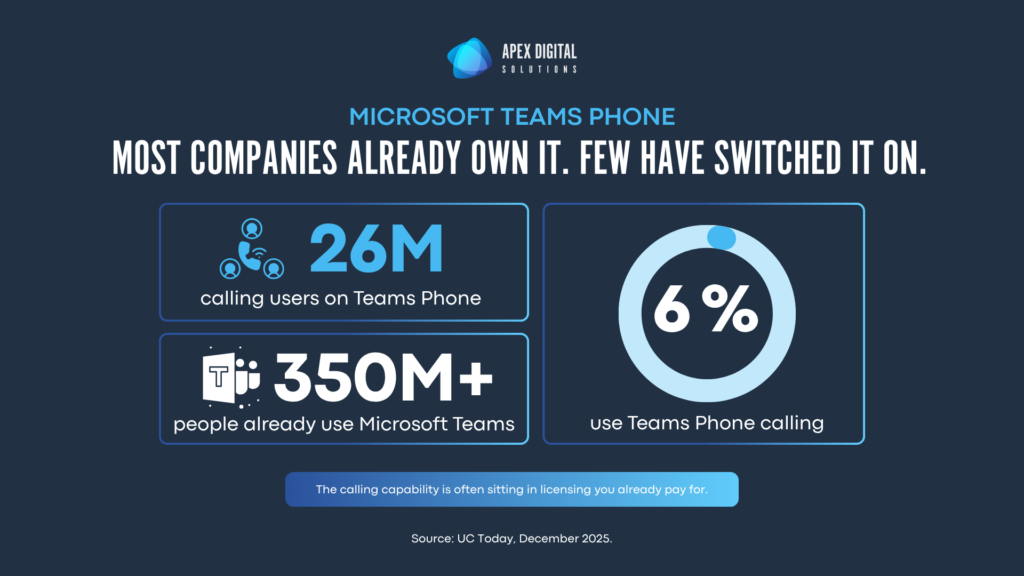
This is also where a lot of organizations discover they already pay for calling capability inside their Microsoft 365 licensing and have never turned it on.
Microsoft Teams Phone passed 26 million calling users at the end of 2025, and that is only about 6 percent of all Teams users. For most organizations the calling platform is already installed alongside the tools their people use all day. They have simply never switched it on.
Sign 5: Maintenance costs keep climbing, and copper is on the way out
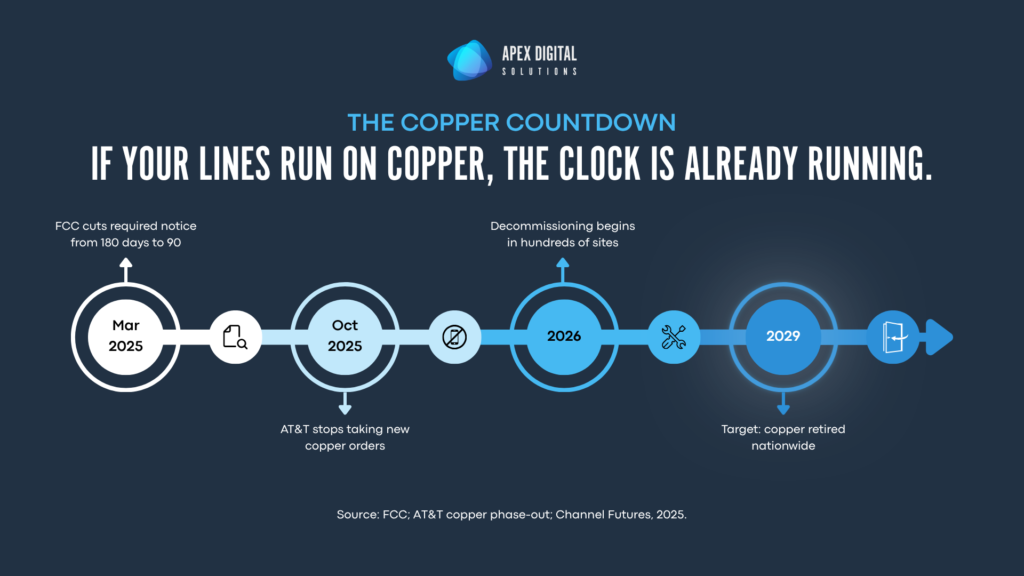
Carriers are retiring the copper lines that traditional phone systems depend on.
AT&T stopped taking new copper orders in October 2025 and begins decommissioning copper service in hundreds of locations through 2026, with a target of retiring it nationwide by 2029. The FCC also cut the notice a business gets before a line is retired from 180 days down to 90. If any part of your system still rides on copper, this stopped being a someday problem the moment your carrier published a retirement date.
| What this means for planning A migration you schedule is almost always cheaper and less disruptive than one your carrier forces on you mid-outage. Because a new system typically takes 45 to 90 days to roll out, starting now keeps the timeline on your terms rather than your carrier’s. |
How to read the signs that you should upgrade your Business Phone
If one or two of these match your environment, you most likely have room to plan. If three or more land, the system is probably costing you more than a replacement would, and it is worth a closer look now rather than during an outage or a line retirement.
The next step does not have to be a rip-and-replace. It starts with an honest inventory of what you have, how it actually performs, and what it really costs to keep running. Once those numbers are in front of you, the right call is usually obvious.
Frequently asked questions
Most business phone systems have a useful life of about five to eight years. It is worth a full review every three to five years, and sooner if you are seeing call quality issues, rising support costs, or limits on remote work. Because a new system can take 45 to 90 days to roll out, many teams start planning 6 to 12 months ahead.
Most businesses are moving to cloud-based phone systems that run over the internet, often called VoIP or UCaaS. Carriers are actively retiring copper lines, so any system that still depends on them will need to move. Cloud platforms such as Microsoft Teams Phone deliver business calling on laptops, mobile devices as well as traditional handsets your team already uses.
Here is a direct test: Can a remote employee make and receive business calls on their laptop or mobile, using their business number and the same features they have at their desk? If staff are handing out personal cell numbers or running a separate app to stay reachable, your system is not fully supporting hybrid work.
For organizations already using Microsoft 365, Teams Phone is often a strong fit because calling lives inside the tools people use every day, and the capability may already be part of your licensing. The right choice depends on your size, call volume, and how your team works, which is why a short assessment of your current setup is a useful first step.
The line or license cost is only the visible part. Add the support hours, repair visits, lost productivity from poor call quality, and the customers who give up when they cannot reach you. Downtime is expensive for businesses of every size, and older systems tend to fail more often. Mapping these hidden costs is usually what makes the case for an upgrade clear.
Many legacy phone systems have not been configured to support compliance with applicable telecommunications requirements. This includes E911 Compliance, Kari’s Law Compliance, RAY BAUM’s Act Compliance, Call Recording Regulations, etc. Non-compliance can put employee and customer safety at risk, expose the organization to regulatory fines, and create significant legal liability if emergency services cannot be reached or do not receive accurate location information.