
AI adoption, collaboration sprawl, and growing identity and data risks are culminating and making it remarkably time consuming for many IT leaders to get a handle on it all. At the same time, many teams are working across a mix of tools and environments, which makes it harder to get clear visibility into what is happening and what should be prioritized next.
Funded Microsoft Security envisioning workshops are structured, time-bound engagements designed to help organizations evaluate their environment and define practical next steps. This article explains what these workshops include, how they work from kickoff to final readout, and what you can expect to walk away with.
Who these workshops are for
These workshops are designed for teams that need clearer direction on security priorities and practical next steps. They are especially useful for IT and technical leaders who want to:
- Build internal alignment around security work and upcoming decisions
- Understand what may be impacting their environment and what changes will best reduce risk
- Walk away with actionable findings and recommendations their team can use to plan work, assign owners, and track progress
What a funded Microsoft Security envisioning workshop is (and what it isn’t)
A Microsoft Security envisioning workshop is…
… a structured, time-bound engagement designed to help you understand what is happening in your environment and determine practical next steps.
It includes configuration of Microsoft Security tooling within a defined scope, a discovery period to surface real findings, and a results readout with prioritized recommendations.
The goal is to provide distinct clarity and direction, so your team can plan improvements and align on what to do next.
A Microsoft Security envisioning workshop IS NOT…
… a basic product demo, a sales presentation, or a generic overview.
But it is also not a full audit or an incident response engagement.
It is not a long consulting project that requires months of work or a major lift from your team.
The workshop is designed to be low-lift and focused, with clear deliverables your team can use internally.
The workshop process, step by step
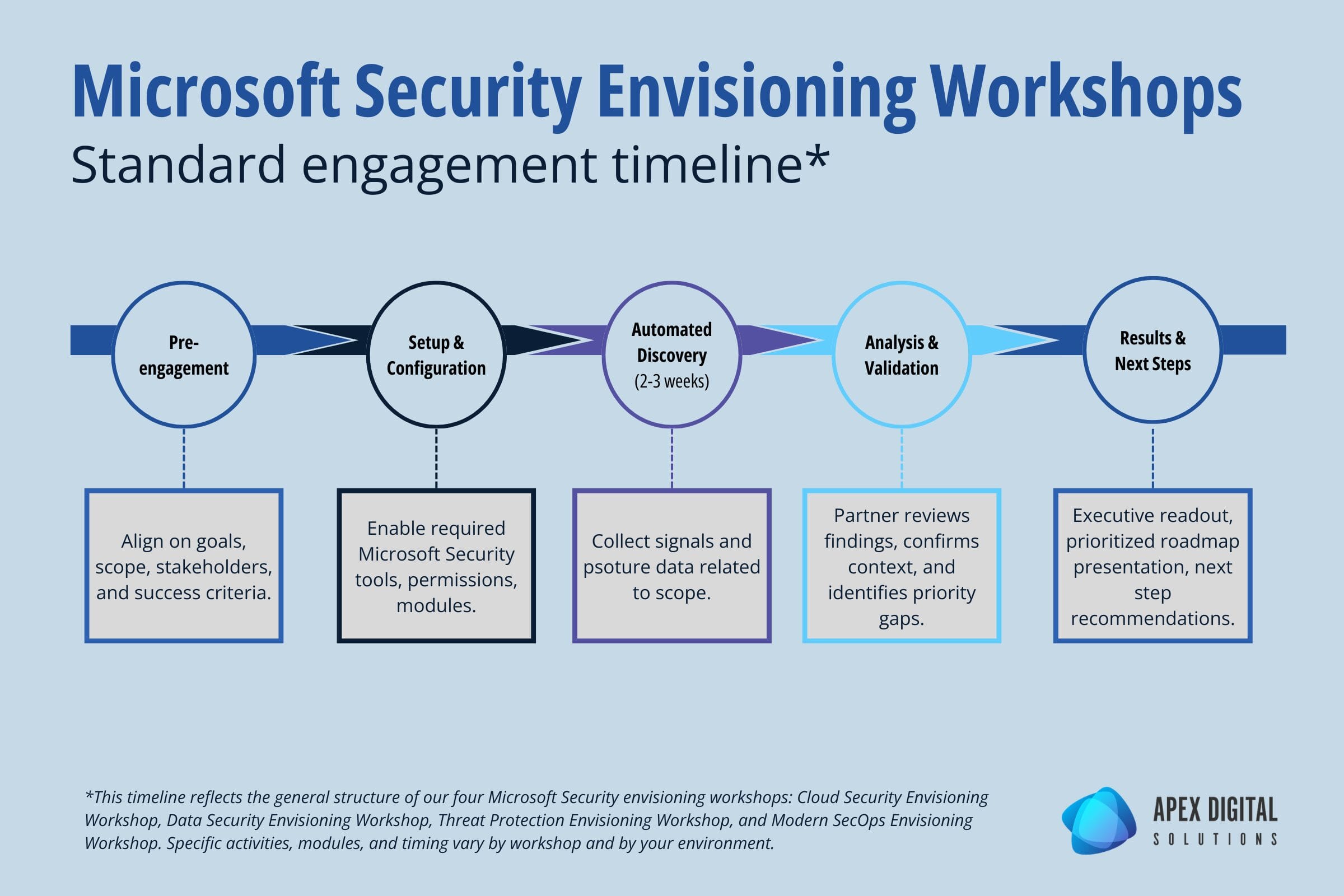
Each funded Microsoft Security envisioning workshop is slightly different based on scope and the tools involved, but the overall experience follows a consistent framework.
Below is the typical flow that happens at each stage and what your team will be responsible for.
Pre-engagement and scoping
Every workshop starts with a short pre-engagement call to align on goals, timelines, and what success looks like.
The partner delivering the workshop will review the workshop scope with you to identify the right stakeholders and confirm the focus areas.
After this call, your team completes a brief questionnaire so the engagement is tailored to your environment rather than a generic walkthrough.
Setup and configuration
Next, the partner configures the required Microsoft Security tools for the engagement within an agreed scope. This work is designed to avoid impact to production users and day-to-day operations.
During this phase, permissions and access are confirmed, required trial licensing is applied when needed, and the workshop modules are configured so discovery can begin.
Automated discovery period (2-3 weeks)
Once setup is complete, there is a discovery period where telemetry, posture, and activity signals are collected over time.
The discovery window varies by workshop, but it typically runs for a couple of weeks or longer depending on the engagement.
Analysis and validation sessions
After discovery, the engagement moves into analysis and review.
The partner evaluates what was surfaced, documents key risks and patterns, and validates context with your team.
Results readout and next steps
The workshop concludes with a results presentation and next steps discussion.
You will receive a clear summary of what was found, why it matters, and what to do next.
Recommendations are prioritized so you can use them for planning, budgeting, and internal alignment.
This final session is also the right time to discuss what a phased implementation could look like if you decide to move forward.
What your team needs to provide (time, access, stakeholders)
In order for the workshops to be successful, coordination from your team is required. Your organization should plan for:
- A primary point of contact to coordinate scheduling and access
- Participation from security and IT stakeholders during key sessions
- Appropriate access to the Microsoft tenant and relevant security tools
- An executive sponsor or decision-maker who can help align priorities and next steps
What you get at the end
Findings summary
You will receive a clear summary of what was found in your environment, including the most important risks, patterns, and gaps surfaced during discovery and analysis.
This is designed to be easy to share internally with both technical stakeholders and leadership.
Prioritized recommendations and roadmap
You will also receive a set of recommended next steps mapped to your priorities and environment.
These are organized in a practical order so your team can decide what to address first, what can be phased over time, and what needs further discussion or validation.
The four funded workshop options
There are four primary workshops to choose from that will help your organization strengthen a different area of your cybersecurity posture.
Many organizations are eligible for more than one funded Microsoft Security workshop, depending on their environment and current Microsoft footprint. If you want to confirm what is available to you, you can check self-check your eligibility.

Cloud Security Envisioning Workshop
This workshop focuses on cloud security posture and threat exposure across Azure and multi-cloud environments. It helps teams identify misconfigurations and vulnerabilities, understand active risks, and define practical next steps to strengthen cloud security.

Data Security Envisioning Workshop
This workshop is designed to uncover data security, privacy, and compliance risks across Microsoft 365 using Microsoft Purview. It focuses on sensitive data discovery, insider risk signals, and oversharing patterns, including risks tied to AI and data access.

Threat Protection Envisioning Workshop
This workshop helps organizations identify active threats and vulnerabilities across email, identity, endpoints, servers, and cloud apps. It is built around Microsoft Defender and related security tools, with the goal of improving visibility and defining a clear plan to reduce risk.

Modern SecOps Envisioning Workshop
This workshop is for organizations evaluating Microsoft Sentinel and the Unified SecOps Platform to improve security operations. It focuses on SIEM readiness, integrating Microsoft and third-party data sources, improving threat investigation and triage, and defining next steps for SecOps modernization.
Microsoft Security Envisioning Workshops FAQ
Many organizations can receive these workshops fully funded. Eligibility depends on factors tied to your Microsoft environment and the specific workshop requirements. The simplest way to confirm is to use the self-check eligibility checker.
These workshops are designed to avoid disruption. Configuration is scoped and the goal is discovery and analysis, not changing end-user experiences or rolling out enforcement policies during the engagement.
The engagement uses Microsoft Security tools to collect signals needed for discovery and analysis within a defined period. The discovery window varies by workshop and is two weeks or longer depending on scope. At the end of the engagement, any temporary configuration is decommissioned.
Most workshops work best with a mix of technical and decision-making roles. Technical stakeholders help provide context and validate findings, while leadership helps align priorities and approve next steps.
You will receive a findings summary and a prioritized set of recommendations. Some organizations use that roadmap to plan internal work, while others use it to scope a follow-on deployment or managed services support.