Most enterprises right now are feeling the need to start using AI: executives want momentum, and employees are already experimenting on their own. The question is how to adopt AI without exposing data the business is responsible for protecting.
One large enterprise, an organization with thousands of employees, answered that question in a way worth sharing. Before a single Microsoft 365 Copilot license reached an end user, leadership wanted proof that security controls were working, that data was clean and properly permissioned, and that employees would know how to use AI responsibly. The team partnered with Apex Digital Solutions to run a Microsoft 365 Copilot readiness assessment first, then build everything else on top of it.
The goals were threefold: adopt Copilot with confidence, protect company and customer data, and build a foundation that could scale well beyond a pilot, and eventually beyond Copilot itself, to the coming wave of AI agents.
FREE GUIDE
Governance and AI readiness go hand in hand. Get the Orchestry guide to Microsoft 365 governance and AI readiness →
Why Copilot readiness starts before the first license
Microsoft 365 Copilot grounds its answers in the content each user already has permission to access. That is what makes it useful, and it is also why permissions and data hygiene matter so much. If a document is overshared, Copilot can surface it faster than anyone would find it by hand. Readiness work closes those gaps before employees ever open Copilot.
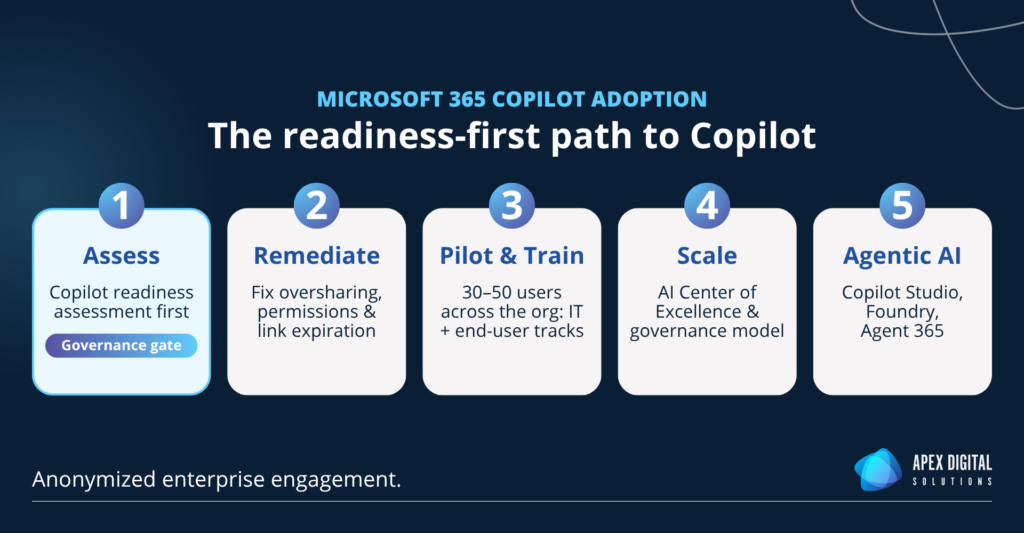
As a Microsoft Solutions Partner specializing in Modern Work and Security, Apex Digital advised a readiness-first roadmap: validate the environment with evidence, remediate what the data shows, train a deliberately cross-functional pilot group, and only then expand.
Before any technical work began, Apex Digital aligned IT, security, and business stakeholders and defined, in concrete terms, what “ready” would mean for the organization, both technically and organizationally.
What a Microsoft 365 Copilot readiness assessment covers
A Microsoft 365 Copilot readiness assessment is a structured review of your tenant, licensing, data permissions, and sharing controls, completed before you deploy Copilot. It confirms that sensitive data is properly permissioned and that security controls are verified rather than assumed.
For this engagement, Apex Digital delivered a formal Copilot readiness assessment of the tenant. The findings gave the security team a clear, evidence-based picture:
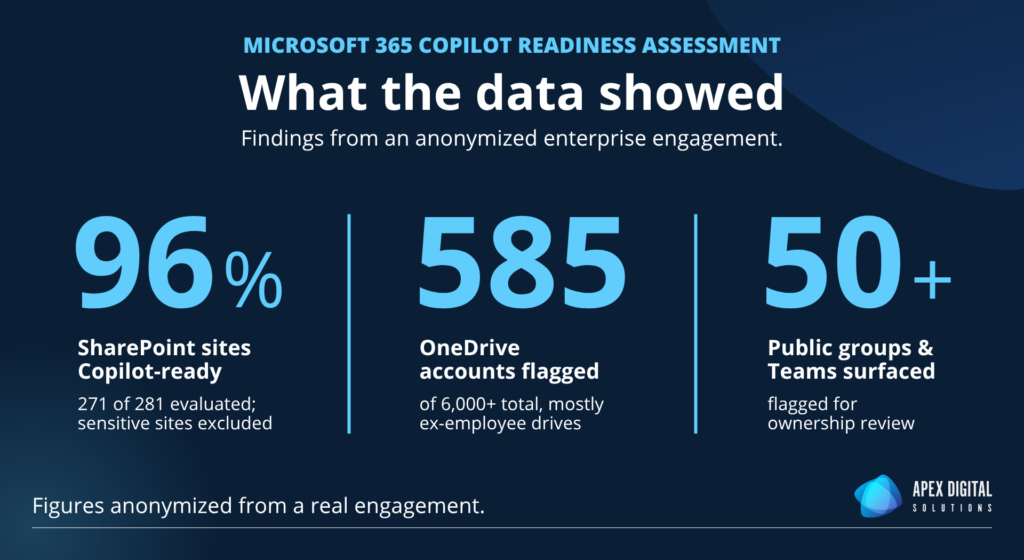
- 281 SharePoint sites evaluated, with 271 already Copilot ready. The remainder held sensitive content, such as financial and tax records, that could be deliberately placed outside Copilot’s reach.
- 585 of more than 6,000 OneDrive accounts flagged, largely the drives of departed employees still shared with active staff.
- Sharing links with no expiration date, addressed with a tenant-level link expiration policy and document lifecycle guidance.
- Public Teams and 50 public groups surfaced for ownership review, so collaboration boundaries match how the organization actually works.
The assessment became the governance gate for the entire project. Data exposure questions were answered with evidence before licensing decisions were made, responsible AI use was written directly into user training, and the security team could show leadership that controls were verified, not assumed.
GO DEEPER
Want the technical checklist behind this work? Read How to Secure Microsoft 365 Copilot Before Rollout →
Train a pilot group before you scale
Technical readiness only goes so far if employees do not know how to use the tool well. The enterprise assembled a pilot group of 30 to 50 employees drawn from across the organization, and Apex Digital delivered training on two tracks:
- An IT track covering administration, controls, and support.
- An end-user track covering how Copilot works, responsible and effective use, and practical scenarios tied to each participant’s role.
The training removed the uncertainty that stalls most first-time Copilot users. The pilot rollout has since validated both the controls and the approach.
From “are we ready?” to “how do we scale?”
With the pilot proving out, the conversation shifted. The engagement is now expanding upward and outward. Apex Digital is scoping executive-level AI training and a three-workshop AI Center of Excellence strategy series to define the organization’s prioritized use cases, governance model, and adoption measures for scale.
The clearest measure of progress so far is behavioral. An organization that deliberately slowed AI down at the start is now planning its acceleration on a foundation its own security team has validated.
Building the foundation for agentic AI
The value of this work reaches further than Copilot. Permissioned data, working security controls, trained users, and an emerging governance model are exactly what agentic AI will demand next. The prioritized use cases and controls being defined in the AI Center of Excellence are the same disciplines an organization needs before it builds and governs agents of its own.
When the enterprise is ready to build agents with Microsoft Copilot Studio or Microsoft Foundry, and to govern a growing fleet of them with capabilities like Microsoft Agent 365, it will start from readiness rather than remediation. That is the posture that defined the engagement from day one.
Roll out Microsoft 365 Copilot with confidence
AI adoption rewards organizations that prepare. A Microsoft 365 Copilot readiness assessment turns the “are we ready?” question into a documented answer, protects the data you are responsible for, and gives leadership the confidence to scale. Whether you are evaluating Copilot, planning a pilot, or preparing for AI agents, readiness is the difference between deploying with confidence and cleaning up later.
Apex Digital Solutions helps organizations assess Copilot readiness, remediate what the data shows, and train teams to use AI responsibly. Explore Apex Digital’s Microsoft 365 Copilot services →