

Sales, service, front desk, and support teams use Microsoft Teams to chat internally, jump on calls, share files, and pull in the right people when an issue needs quick attention.
The problem is that traditional call queue management has often lived somewhere else.
Because of this, agents may lack a clear view of queue activity, supervisors may have limited visibility into live performance, and simple changes can end up back on IT’s plate.
Microsoft introduced the Queues app to close that gap by bringing collaborative call handling, queue visibility, and lead oversight directly into Teams.
For organizations evaluating Teams Phone, this matters because Queues app expands what Microsoft can do for shared calling scenarios without forcing teams out of the platform they already know. If you’re planning Teams Phone, start here: https://apexdigital.com/microsoft-teams-phone/
What the Queues app is
Instead of treating queue-based calling as something that has to be managed in a separate tool, Microsoft brings those call-handling activities into the Teams environment your users already work in every day.
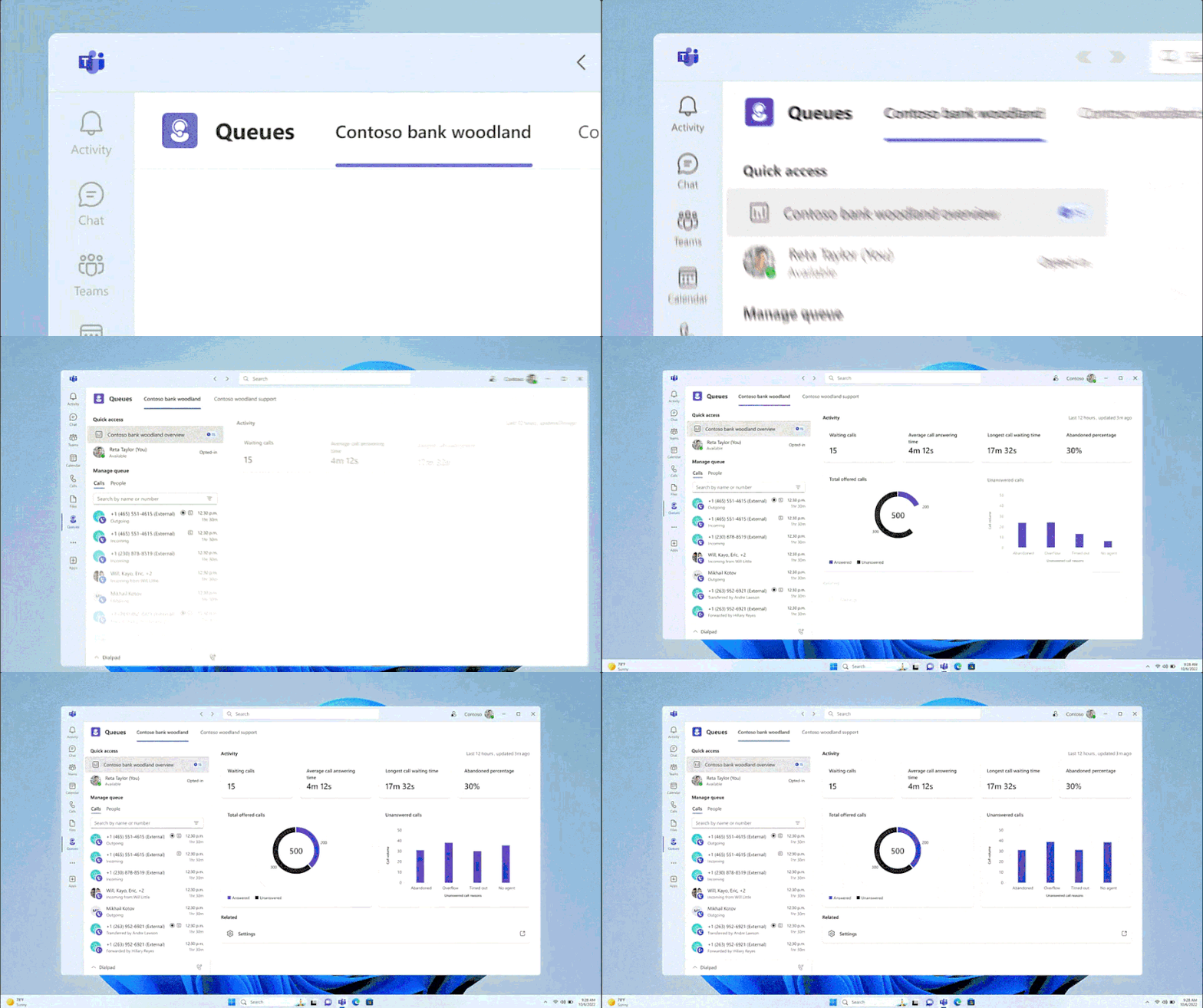
The app gives customer-facing teams a single place to work with shared calling workflows. Team members can handle incoming PSTN or VoIP calls, make outgoing calls on behalf of the call queues or auto attendants they are assigned to, review queue activity, and work with teammates without leaving Teams. This gives a more connected experience for front desk, service, and support teams, especially when calls often require quick internal coordination.
The Queues app is built around two distinct user groups: agents and authorized users.
- Agents are the people actively taking calls as part of a queue. They can opt in and out of assigned queues, see available queues, and manage their participation directly from the app.
- Authorized users, often team leads or supervisors, have a broader operational role. Microsoft allows IT admins to delegate these users so they can manage settings such as queue membership, hours of operation, call routing, and greetings directly in Teams, based on the permissions granted through voice applications policies.
The result is a calling experience that feels more embedded in daily work and better suited for teams that need to respond quickly, collaborate often, and keep shared lines running smoothly inside Microsoft Teams.
Microsoft Queues licensing and prerequisites
To use the Queues app in Microsoft Teams, users need both Teams Phone and Teams Premium.
Queues app is not included with Teams alone, and Teams Premium does not replace a Teams license. It is an add-on, which means users still need an underlying Teams license in addition to Teams Premium for those features to work.
Note: After a user is assigned Teams Premium, Microsoft notes that it can take up to 48 hours for the Queues app to appear in the Teams client.
Users must also be voice enabled, and they must be part of at least one call queue to actually use the app as intended.
If you want team leads or supervisors to manage day-to-day operational changes such as queue membership, greetings, routing rules, or hours of operation, you also need to configure and assign the appropriate voice applications policy.

Queues app capabilities for daily operations
Outbound calling on behalf of queues and auto attendants
One of the most practical capabilities is the ability for users to place outbound calls on behalf of the call queues or auto attendants they are assigned to. This helps teams present a consistent caller identity instead of exposing individual direct numbers, which is especially useful for shared service desks, reception teams, and departments that want calls to come from one recognizable business line.
Supervisor tools: Monitor, Whisper, Barge, and Takeover
Queues app also supports supervisor features such as Monitor, Whisper, Barge, and Takeover. These tools give supervisors a way to coach live, support new agents during difficult calls, and step in when a customer interaction needs immediate help.
Shared call queue history context
Microsoft’s shared call queue history capability gives agents and supervisors a broader view of what has happened in the queue, including missed calls, voicemails, and richer call history details. In the user experience, call history can include calls that were answered as well as missed calls with voicemail. Users get more context before calling someone back, and supervisors get a clearer view of follow-up activity so fewer customer interactions slip through the cracks.
Taken together, these features make Queues app more than a simple queue dashboard.
What you can measure with Queues App Reporting
There is the live operational view inside Queues app, a shorter in-app historical view, and a deeper historical reporting option through Microsoft’s Power BI template. Each serves a different purpose, and knowing the difference helps set the right expectations for supervisors, operations leads, and IT.
Real-time metrics in Queues app
This layer includes measures like:
- The number of waiting calls
- Average wait time
- Longest waiting call
In practice, this is the reporting layer teams use when they need to understand what is happening right now and decide whether they need to shift staffing, coach agents, or jump in to support a busy queue.
In-app historical reporting for the last 27 days
These historical metrics cover call queues, auto attendants, and agent queue actions, but they are limited to up to the past 27 days.
That makes this layer useful for short-term trend review, recent performance discussions, and operational check-ins, but not for long-range analysis or quarter-over-quarter reporting.
If a team wants to review what happened over the past few weeks, this can be enough. If they need a broader reporting window, they will need something beyond the in-app view.
Power BI historical reports for deeper analysis
The third layer is Microsoft’s historical reporting template for Power BI.
This is the better fit for organizations that want a more complete historical view of auto attendant and call queue activity.
This data is typically available within 30 minutes of a call being completed, but there are cases where it can take several hours to appear.
Conclusion
Queues app can be a strong fit for organizations that want better visibility, stronger day-to-day queue management, and a more connected calling experience inside Microsoft Teams. For teams already using or planning Teams Phone, it adds useful operational capabilities without requiring users to leave the platform they already know.