

Organizations need phone and collaboration tools that support users across offices, home environments, and mobile work. Microsoft Teams brings chat, meetings, collaboration, and calling together in one platform, giving businesses a more connected way to communicate.
Microsoft Teams is the hub for teamwork in Microsoft 365, combining meetings, chat, collaboration, and calling in one platform. With Teams Phone, it can also serve as a business phone solution for organizations that need PSTN calling.
Teams Phone supports core business calling capabilities such as answering and placing calls, call forwarding, voicemail, emergency calling, and a range of additional voice features based on the organization’s deployment and licensing.
Organizations can connect Teams Phone to the PSTN in several ways, including Microsoft Calling Plan, Operator Connect, Teams Phone Mobile, and Direct Routing. Direct Routing is typically chosen when an organization wants to use its own carrier, support more specialized telephony requirements, or maintain greater control over PSTN connectivity.
Looking at more than just Direct Routing?
Learn how Teams Phone supports business calling and compare the voice options available for your organization.
What is Direct Routing with Microsoft Teams?
Direct Routing lets you connect a supported, customer-provided Session Border Controller (SBC) to Microsoft Teams Phone. With this capability, you can configure PSTN connectivity for Teams through your chosen carrier and SBC deployment model.
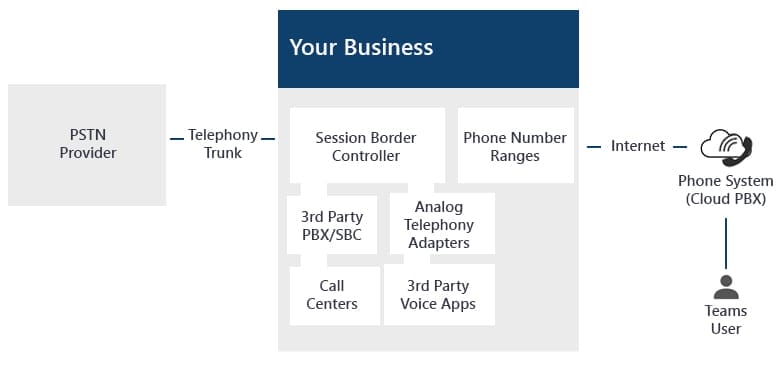
A Session Border Controller (SBC) is the component that connects your telephony environment to Microsoft Teams Phone for Direct Routing. Microsoft requires a supported, certified SBC for this deployment model. SBCs may be deployed on-premises, in the cloud, or through a managed provider, depending on the solution design.
In many Direct Routing deployments, SIP trunking is part of how the organization’s telephony environment connects to the PSTN through its provider and SBC architecture.
Who should consider Direct Routing with Microsoft Teams?
Direct Routing is a strong fit for organizations that want to use Microsoft Teams Phone for calling, but need PSTN connectivity through a third-party provider and Session Border Controller (SBC). It is one of several PSTN connectivity options available in Teams.
- Microsoft Calling Plan may not be available in one of the organization’s locations. In some cases, Operator Connect may also be a good fit if the preferred carrier participates in Microsoft’s Operator Connect program.
- The organization needs to integrate Teams Phone with existing telephony infrastructure, third-party platforms, or specialized voice environments.
- The organization wants to keep working with its current PSTN carrier or use a preferred provider.
Organizations with limited internal telephony resources may also prefer a managed Direct Routing model through a qualified provider, especially when they want outside support for deployment, monitoring, and ongoing management.
Direct Routing can also be delivered through fully managed or hosted SBC models, depending on the provider. Available capabilities may include reporting, monitoring, call recording, analog device support, and contact center integrations, depending on the solution selected.
What are the benefits of using Direct Routing with Microsoft Teams?
Direct Routing can offer several benefits for organizations that need more control over carrier choice, telephony integration, or deployment design.
- Unified communication and collaboration platform: Teams brings chat, meetings, calling, and file sharing into one platform, and Direct Routing extends that experience to PSTN calling through a third-party provider.
- Calling and Teams features: Direct Routing allows organizations to use Teams Phone as part of their calling environment while supporting features such as call transfer, auto attendants, call queues, and other voice experiences available through Teams Phone and the broader deployment design.
- Flexible calling experience: Users can make and receive calls in Teams across desktop and mobile experiences, while organizations maintain PSTN connectivity through their chosen provider.
- Provider flexibility and deployment control: Direct Routing can help organizations align PSTN connectivity with existing carrier relationships, regional requirements, and technical needs. Cost outcomes vary depending on licensing, provider contracts, SBC model, and support structure.
- Support phone number continuity: Direct Routing can support number retention and assignment planning, depending on your carrier relationship, migration path, and deployment model.
- Flexibility with preferred providers: Direct Routing allows organizations to use their preferred PSTN operator through a supported SBC model, giving them more control over how PSTN connectivity is delivered.
What licenses do I need to use Direct Routing with Microsoft Teams?
Organizations using Direct Routing do not need a Microsoft Calling Plan for users whose PSTN connectivity is provided through Direct Routing. They do still need the appropriate Microsoft licensing to use Teams Phone.
- A Teams Phone license is required for users who need to make and receive PSTN calls through Direct Routing.
- An Audio Conferencing license is only needed for users who will schedule or host Teams meetings with dial-in phone access. It is not a blanket requirement for every Direct Routing user. Audio Conferencing is included in some E5 plans and is typically an add-on for E1 or E3 users.
Organizations using Direct Routing should also plan for PSTN service costs from their carrier and any related SBC, hosting, or managed service costs. These costs vary by provider and deployment model.
Conclusion
As organizations evaluate modern voice solutions, many are looking for a calling experience that fits naturally within the collaboration tools employees already use. Teams Phone supports that approach by bringing calling into the same platform used for chat, meetings, and day-to-day teamwork.
With Direct Routing, organizations can connect Microsoft Teams Phone to the PSTN through their preferred carrier while continuing to use Teams as their central communication and collaboration platform.
Apex Digital can help organizations evaluate Teams Phone options, plan PSTN connectivity, and support deployment based on their technical and operational requirements. Whether Direct Routing is the right fit depends on factors like carrier preference, geographic needs, existing telephony infrastructure, and long-term support goals. Learn More >>