
Microsoft recently announced additional Microsoft 365 licensing changes for 2026, following the commercial updates we covered earlier. This new update includes Microsoft 365 Government pricing changes effective July 1, 2026, along with Extended Service Terms (EST) that change how CSP subscriptions handle end-of-term scenarios starting April 1, 2026.
This article outlines what’s changing, explains the new renewal options that replace the historic grace period, and summarizes the new value being added to key Government plans.
You’ll also find the key dates, the most common impacts teams will feel first, and a clear set of actions to take ahead of upcoming renewals so you can plan budgets and avoid service disruptions.
Cloud Solution Provider Renewal Changes (for all license types)
What’s changing with CSP renewals in 2026?
Effective April 1, 2026, Microsoft will discontinue the free grace period for CSP subscriptions that reach end of term and are not renewed. After expiration, partners/customers must choose one of three paths: Renew, Cancel at expiration, or Renew to Extended Service Term (EST) to continue service.
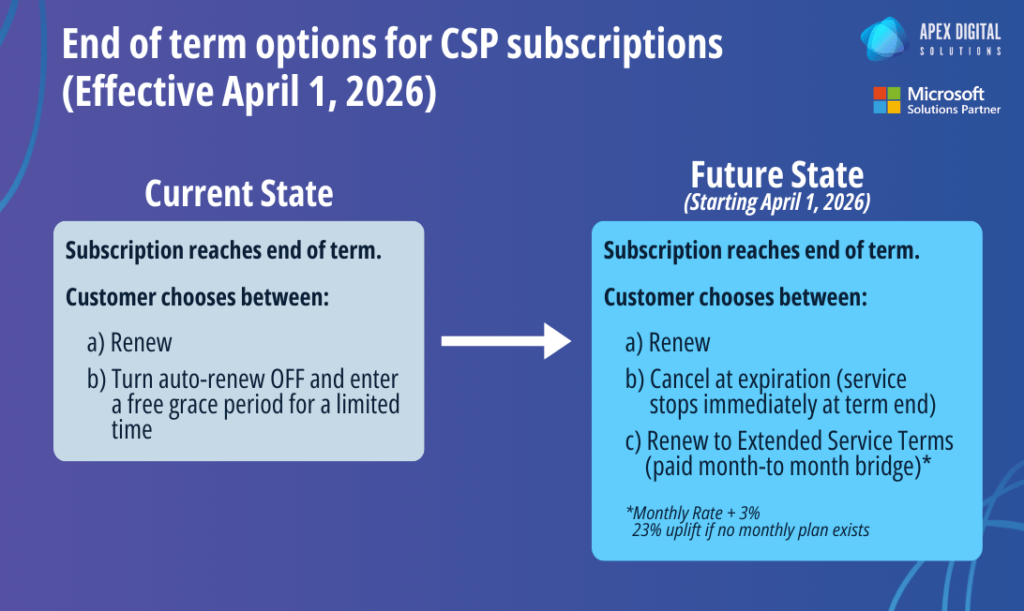
Current state (today)
- Renew
- Turn auto-renew off and receive a limited period of free service (grace period)
Future state (starting April 1, 2026)
- Renew
- Cancel at expiration (service stops at end of term; data retention remains, but the subscription can’t be reactivated)
- Renew to EST (continue service monthly while you finalize next steps)
EST is meant to be temporary and is billed monthly. If you choose EST at end of term, Microsoft converts that subscription into a month-to-month billing approach while you decide what to do next.
- The monthly EST price is your standard monthly rate, plus a 3% uplift.
- If a monthly term is not available for that SKU, the uplift is higher (23%).
You can stay on EST while you finalize renewal changes, an upgrade, or a cancellation, but you should expect it to cost more than a standard annual term.
Why Microsoft is making these changes to licensing renewal terms
Microsoft is formalizing what happens at end of term by replacing the free grace period with a paid extension option. This change pushes renewal decisions to happen on purpose, instead of subscriptions continuing through a default grace window when a customer has not made a clear renewal or cancellation decision.
Extended Service Terms also provides a defined “bridge” option for situations where procurement, approvals, or internal planning run long, while still keeping Microsoft’s end-of-term process consistent and predictable.
How the 2026 CSP renewal changes affect your organization
Higher risk of disruption if renewals are delayed
If a renewal decision is missed, the default outcome becomes more urgent: you either accept immediate service cutoff or pay for EST.
Potential cost spikes for indecision
EST is useful when you need extra time, but it comes with an uplift that can add up quickly, especially for large seat counts.
Who this applies to
These EST changes apply to any eligible CSP subscriptions managed in Partner Center, (not just Government licenses).
What actions to take, and by when for CSP renewal term changes
Now
- Map end dates for all CSP subscriptions and identify which renewals routinely get delayed by approvals, funding cycles, or procurement.
- Confirm who owns the renewal decision (IT vs finance vs procurement) and who has authority to approve an EST if timelines slip.
- Add renewal reminders and escalation steps so subscriptions don’t lapse without an intentional outcome.
At renewal / end of term
- Choose a path on purpose:
- Renew (as-is or with planned changes)
- Cancel at expiration (if you’re intentionally offboarding)
- Renew to EST (if you need a short bridge)
- If you use EST, set a hard decision date to avoid carrying the uplift month after month.
If you want help mapping renewal dates, clarifying which subscriptions are affected, and setting a clear plan for how your team will handle end-of-term decisions, book a free consultation with Apex Digital.
Changes to Microsoft 365 Government Licensing
What’s changing with Microsoft 365 Government Licensing in 2026?
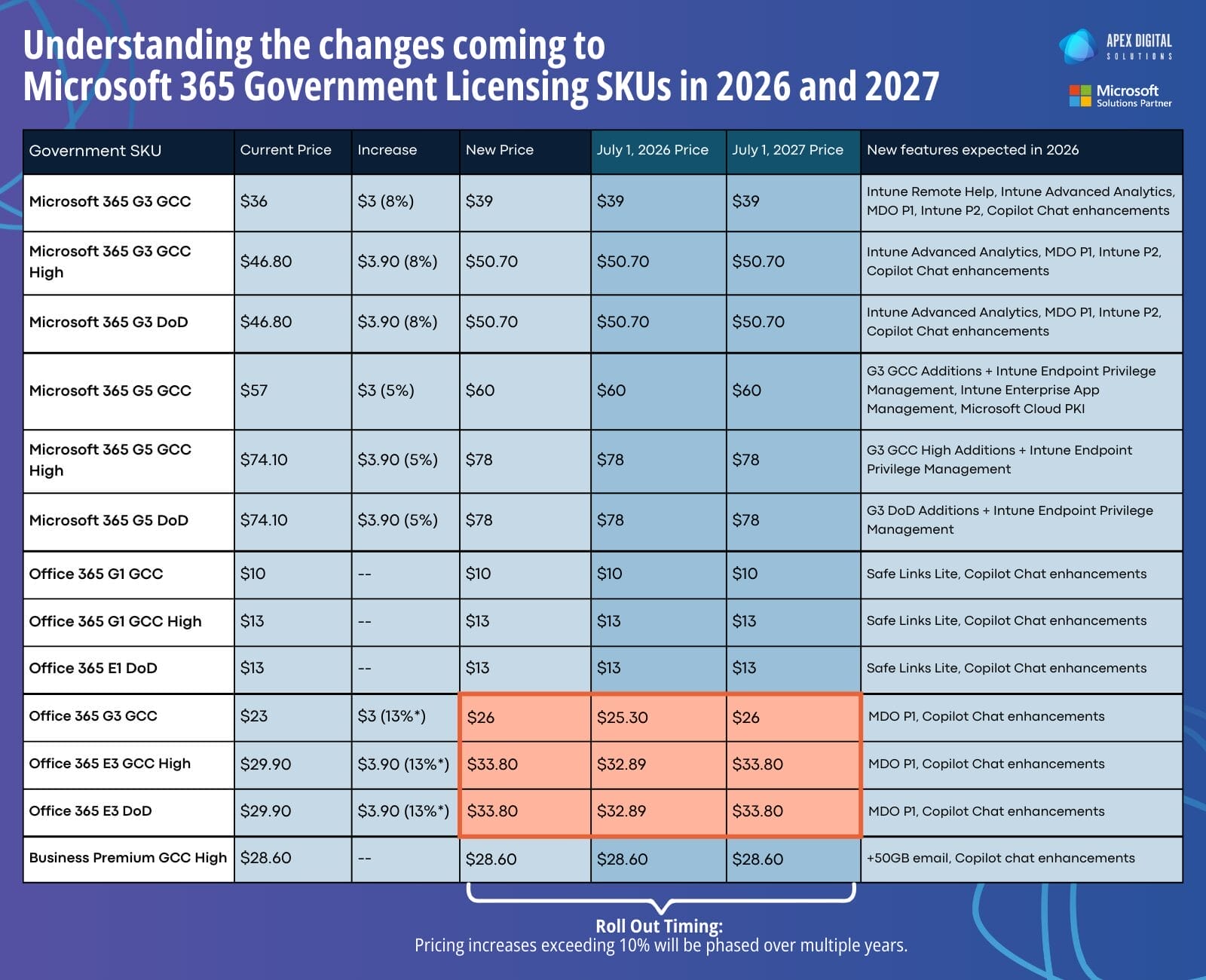
Microsoft has confirmed a pricing update for specific Microsoft 365 Government suites effective July 1, 2026. The table below shows the old price, the increase, and the new price, along with any SKUs where the increase is phased into 2027.
Microsoft 365 G3 (Government)
- Microsoft 365 G3 GCC: $36 → $39 (+$3, 8%)
- Microsoft 365 G3 GCC High: $46.80 → $50.70 (+$3.90, 8%)
- Microsoft 365 G3 DoD: $46.80 → $50.70 (+$3.90, 8%)
Microsoft 365 G5 (Government)
- Microsoft 365 G5 GCC: $57 → $60 (+$3, 5%)
- Microsoft 365 G5 GCC High: $74.10 → $78 (+$3.90, 5%)
- Microsoft 365 G5 DoD: $74.10 → $78 (+$3.90, 5%)
Office 365 Government
- Office 365 G3 GCC: $23 → $26 (+$3, 13%)
- Phased pricing changes*: $25.30 on July 1, 2026, then $26.00 on July 1, 2027
- Office 365 E3 GCC High: $29.90 → $33.80 (+$3.90, 13%)
- Phased pricing changes*: $32.89 on July 1, 2026, then $33.80 on July 1, 2027
- Office 365 E3 DoD: $29.90 → $33.80 (+$3.90, 13%)
- Phased pricing changes*: $32.89 on July 1, 2026, then $33.80 on July 1, 2027
*For Government suites where the total increase exceeds 10%, Microsoft will implement a phased approach, with part of the increase applied in 2026 and the remainder applied in 2027.
Why Microsoft is making these changes to Government licenses
Microsoft is updating Government pricing alongside a set of expanded capabilities being added to Microsoft 365 Government suites in 2026. The updates center on stronger security coverage, expanded endpoint management functionality, and additional Copilot Chat-related enhancements where available in Government environments.
In the next section, we break down what’s being added by suite so you can see where the value is showing up and whether it changes how you think about your current licensing mix.
What’s being added to Microsoft 365 Government suites in 2026
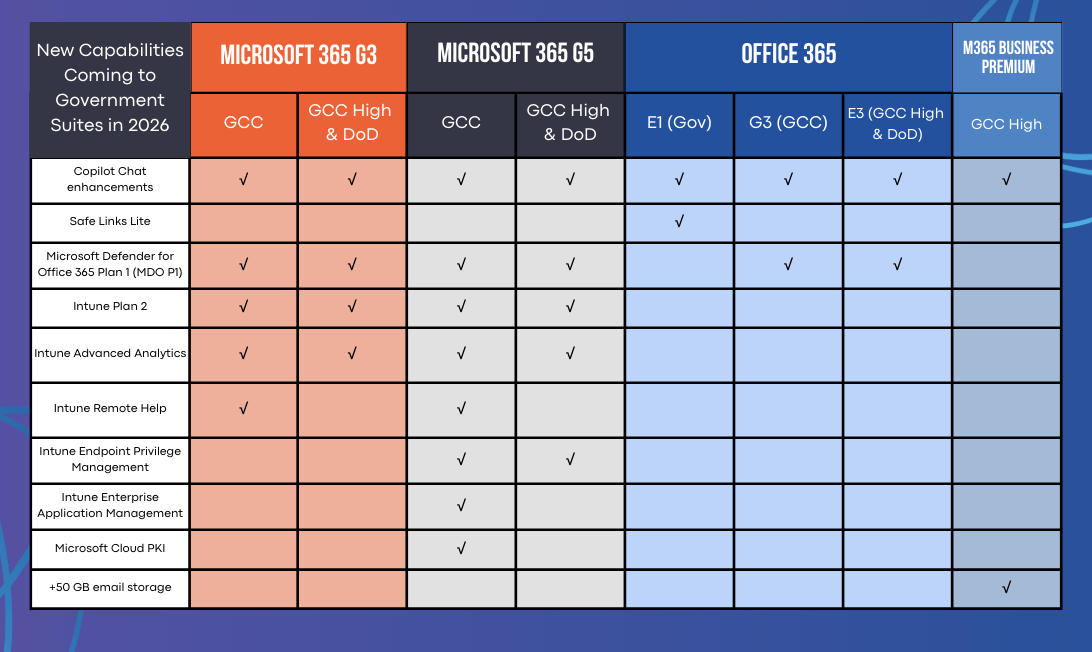
Microsoft is adding a set of capabilities across Microsoft 365 Government suites in 2026. The exact mix varies by environment (GCC vs GCC High vs DoD), but the changes fall into a few clear buckets: stronger email security, expanded endpoint management, and Copilot Chat enhancements.
1) Email and link protections
- Microsoft Defender for Office 365 Plan 1 (MDO P1) is being added to several Government suites (including Office 365 Government and Microsoft 365 Government plans, depending on environment).
What it does: improves protection against phishing, malware, and malicious links across email and collaboration.
Why it helps: raises the baseline for email security without requiring a separate Defender add-on in many cases. - Safe Links Lite is included for Office 365 E1 Government.
What it does: checks links when users click them to reduce the chance of successful phishing.
Why it helps: adds protection for users who operate with less security coverage today.
2) Endpoint management additions
- Intune Plan 2 and Intune Advanced Analytics are being added to Microsoft 365 Government suites (with broader coverage in G3 and G5 depending on environment).
What they do: expand device management capabilities and add visibility into device health, performance, and trends.
Why they help: improve control and reporting for IT teams, and help reduce recurring device-related issues. - Intune Remote Help will be included in Microsoft 365 G3 GCC
What it does: enables secure remote support sessions.
Why it helps: speeds up support and reduces the need for in-person troubleshooting. - G5 additional device controls include Endpoint Privilege Management and Enterprise Application Management.
What they do: tighten control over admin privileges and improve how apps are deployed and maintained.
Why they help: reduce risk from unmanaged privilege and reduce friction caused by inconsistent app installs.
3) Identity and trust foundation
- Microsoft Cloud PKI is being added to Microsoft 365 G5 Government.
What it does: provides cloud-based certificate services to support device trust and secure access scenarios.
Why it helps: simplifies certificate management while strengthening secure authentication foundations.
4) Copilot Chat enhancements
- Copilot Chat enhancements are listed across many of the Government suites in the table.
What it means in practice: improved Copilot Chat experiences as they become available in Government environments.
Why it helps: supports faster information retrieval and task assistance where enabled.
5) Storage update (Business Premium GCC High)
- +50GB email storage is listed for Microsoft 365 Business Premium GCC High.
Why it helps: reduces mailbox capacity pressure for users nearing limits.
Availability and rollout timing can vary by Government environment (GCC vs GCC High vs DoD) and tenant configuration.
How the changes to Microsoft 365 Government licenses affect your organization
Budget and forecasting
Renewals on or after July 1, 2026 will reflect the new pricing for impacted Government SKUs. That timing matters most for organizations with large seat counts or renewals clustered in the second half of the year.
If you’re on a multi-year structure, you may not see the pricing change until your next renewal or scheduled price reset, so it’s worth mapping renewal dates now rather than assuming July automatically changes spend.
Licensing strategy
Included features may reduce the need for add-ons in some environments. The most common areas to review are email security (Defender for Office 365 P1), endpoint analytics, and Intune capabilities. The goal is to avoid paying twice for the same outcome.
The update creates an opportune time to right-size. A quick tenant review often surfaces unused licenses, users assigned to higher tiers than their role requires, or teams that would benefit from moving to a plan that now includes capabilities you were buying separately.
Procurement and stakeholder alignment
Budget owners, IT, procurement, and program leadership often need to align before changes can be approved. These updates increase the cost of waiting, because late decisions can lead to rushed renewals, missed optimization opportunities, or higher spend locked in for another term.

What actions to take, and by when for Government License changes
Now
- Confirm your Government environment and SKUs (GCC vs GCC High vs DoD) and map renewal dates through the end of 2026 so you know exactly when the pricing change will show up.
- Confirm decision ownership across IT, finance, and procurement so renewal approvals do not stall in the final weeks.
Before July 1, 2026
- Run a license audit: assigned vs unassigned, inactive users, and whether roles truly require their current license level.
- Review add-ons you currently purchase and compare them to what will be included in the updated suites, especially in email security and endpoint management, so you can avoid overlap.
At renewal
- Finalize the SKU mix based on current usage and risk requirements for each user group.
- Choose the right term length based on your budget cycle, procurement lead time, and how often you expect licensing needs to change over the next 12–24 months.
If you want help modeling these changes against your renewal dates and current license mix, book a free consultation with Apex Digital.
FAQ: Microsoft 365 Government pricing changes and CSP renewal term changes (2026)
Microsoft’s Government pricing update takes effect July 1, 2026, for the impacted Government SKUs.
Pricing updates (effective July 1, 2026) — affected Government suites
- Microsoft 365 G3
- GCC
- GCC High
- DoD
- Microsoft 365 G5
- GCC
- GCC High
- DoD
- Office 365 G3
- GCC
- Office 365 E3
- GCC High
- DoD
Not affected
- Office 365 E1
- GCC
- GCC High
- DoD
- Microsoft 365 Business Premium
- GCC High
Yes. Where the total increase exceeds 10%, Microsoft indicates pricing may be phased over multiple years, with no more than 10% applied annually until the full increase is implemented. Your table shows this behavior for select Office 365 Government SKUs.
It depends on how and when you renew. Many organizations feel the change most clearly at renewal or when pricing resets based on their agreement structure. Use your renewal dates to determine when the new pricing will show up in spend planning.
Effective April 1, 2026, Microsoft is discontinuing the free grace period for CSP subscriptions that reach end of term and are not renewed. At end of term, you must choose to Renew, Cancel at expiration, or Renew to Extended Service Term (EST).
No. The scope is eligible CSP subscriptions managed in Partner Center, which can include both Commercial and Government offers.
EST is a paid month-to-month extension you can select at end of term to keep services active while you finalize your plan, such as a renewal decision, an upgrade, or a cancellation.
EST bills monthly at the current monthly term rate + 3% uplift. If the SKU does not have a monthly plan available, Microsoft notes the uplift can be 23%.
Service stops at the end of the subscription term. Microsoft notes that data retention is preserved, but the subscription cannot be recovered or reactivated. Treat cancellation as an intentional offboarding step, not a pause button.
Use EST when you need a short bridge because a decision is pending, such as procurement delays, budget approval, or an internal licensing review. EST works best when you set a firm internal deadline for the final decision so it does not extend month after month.
EST is not designed to reduce cost. It exists to avoid disruption when decisions are delayed, and it adds an uplift. If your goal is cost planning, focus on renewal timing, term length, and right-sizing based on usage.
For CSP renewal term changes, eligibility is the key factor, not org type. If a nonprofit buys through CSP in Partner Center, the April 1, 2026, renewal rules can apply.
For Government pricing, the July 1, 2026, update applies to the Government SKUs Microsoft has announced, which are tied to Government cloud environments.
Start with two quick steps:
- Map renewal dates and identify subscriptions that end near April 1, 2026, and July 1, 2026.
- Run a license audit and decide who approves renewals and any potential EST use. This can be done by working with a reputable Cloud Solutions Provider.