Microsoft 365 oversharing is content that more people can reach than the business intended, through “Anyone” links, company-wide groups, guests nobody removed and permissions inherited from a parent site.
It is a security exposure because a compromised account, a departed contractor, a forwarded link or a Copilot prompt reaches everything those permissions allow, and most tenants cannot list what that is.
In brief
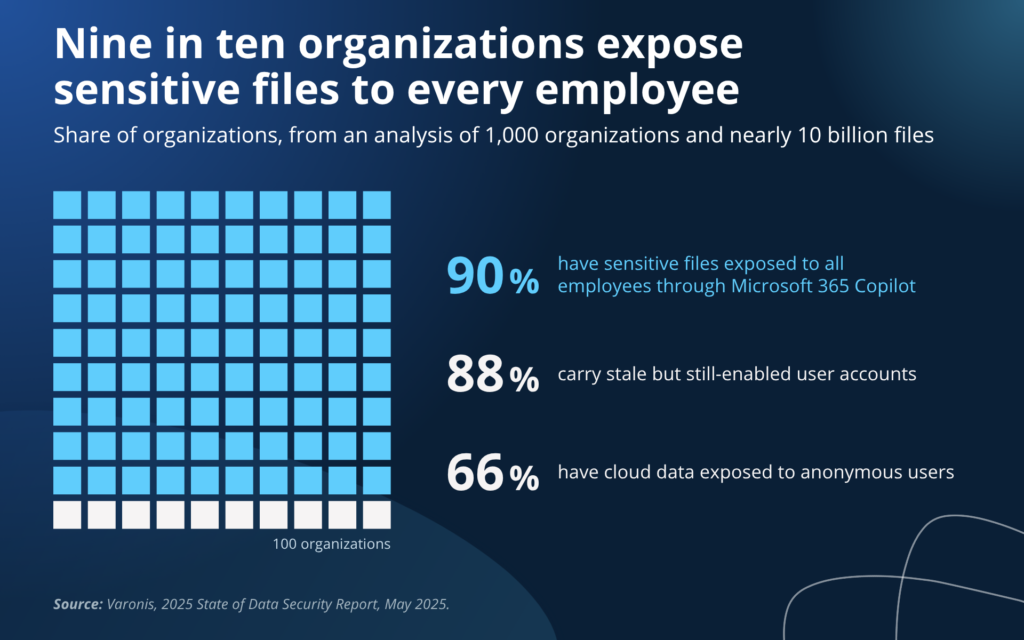
- 90% of organizations have sensitive files exposed to all employees through Microsoft 365 Copilot, 88% carry stale but still-enabled accounts and 66% have cloud data exposed to anonymous users (Varonis, 2025, 1,000 organizations).
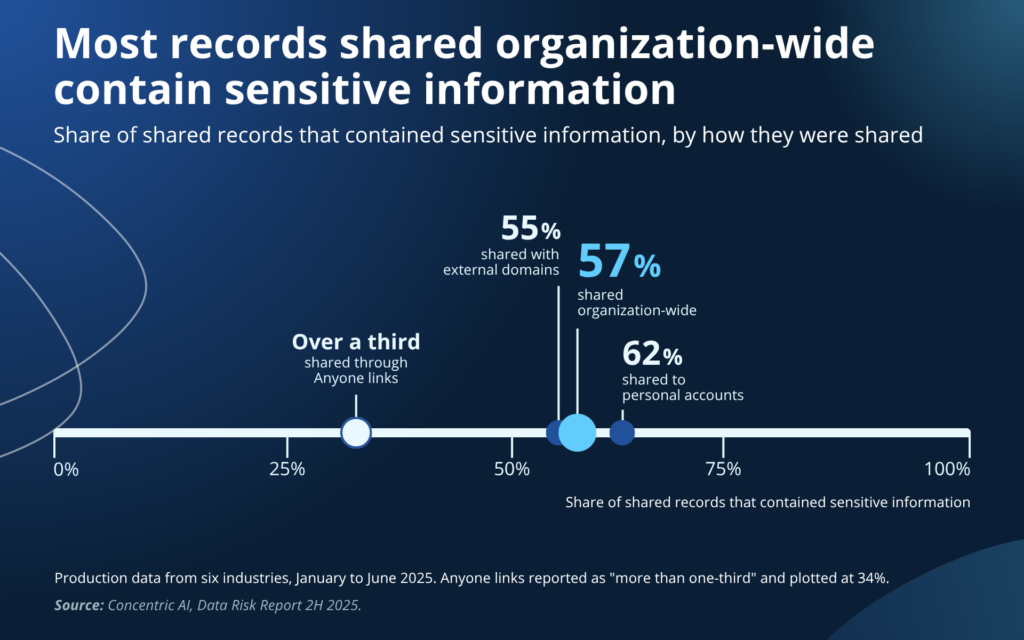
- 57% of records shared organization-wide, and more than a third of records behind “Anyone” links, contained sensitive information (Concentric AI, 2H 2025).
- SharePoint’s defaults favor sharing. The tenant sharing level and the default link type are both “Anyone”, and “Anyone” links do not expire unless an admin sets a limit (Microsoft Learn).
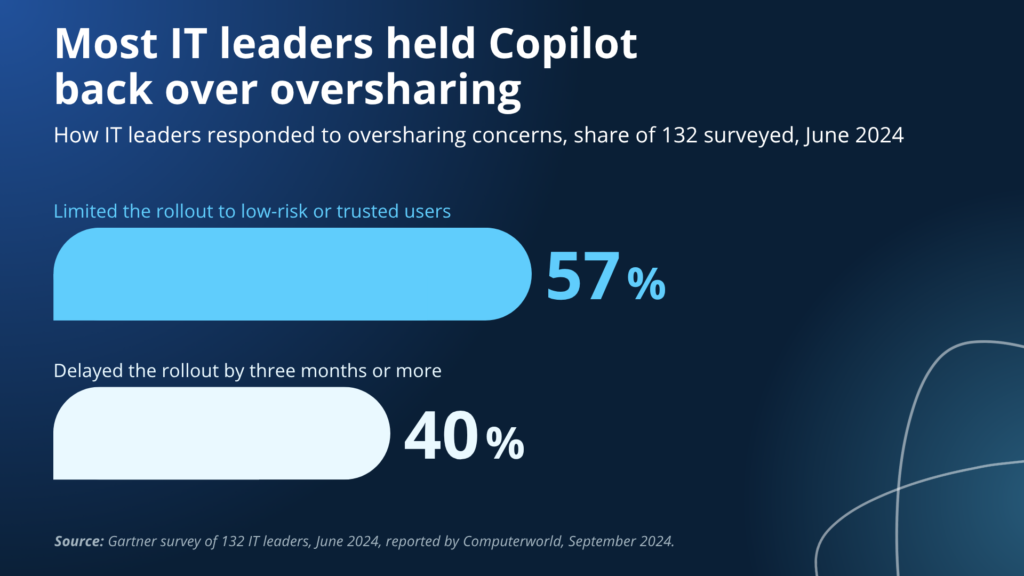
- Copilot makes every existing permission reachable. 40% of IT leaders delayed their Copilot rollout by three months or more over oversharing concerns, and 57% limited it to trusted users (Gartner survey of 132 IT leaders, June 2024).
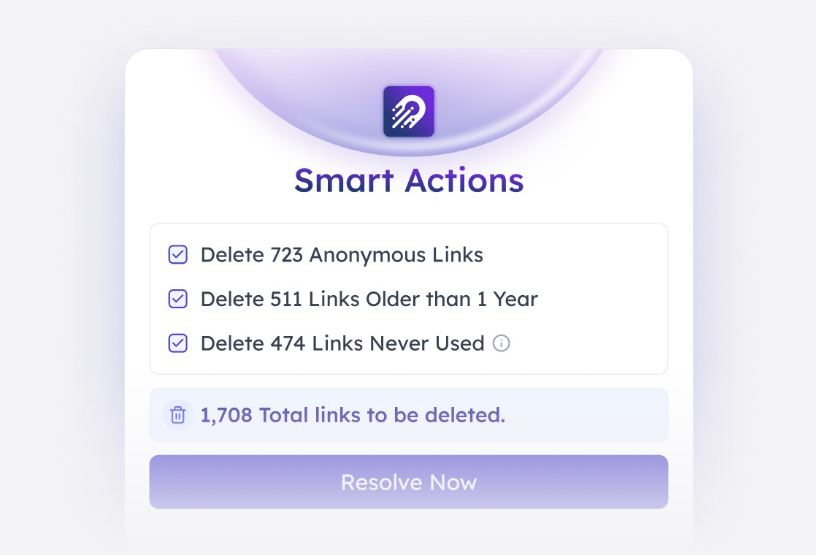
- Orchestry, the Microsoft 365 governance platform Apex Digital deploys and manages, turns oversharing cleanup into recurring policy: bulk removal of anonymous, year-old and never-used links across the tenant, a named sponsor and review cadence for every guest, and scheduled workspace reviews that escalate when an owner does not respond.
Microsoft 365 oversharing is a security exposure, and the permissions are the attack surface
Attackers and AI tools do not need to break a permission in Microsoft 365, because the permissions already in place do the work. Verizon’s 2026 Data Breach Investigations Report found credential abuse appears somewhere in 39% of breaches, and 48% of breaches now involve a third party, up 60% in a single year. When one account is phished, the blast radius is the sum of what that account can open, and in most tenants that sum was never calculated.
Microsoft defines data oversharing as users having access to more data than their job requires, and its own deployment guidance for Copilot puts remediating that condition first. Varonis’s 2025 State of Data Security Report, drawn from 1,000 organizations, found 99% had sensitive data exposed to AI tools, 88% carried stale but still-enabled user accounts and 66% had cloud data exposed to anonymous users.
Our Microsoft 365 governance guide treats oversharing as one of four governance domains. This page is the deeper cut on that domain: where the exposure comes from, what Microsoft’s native tools find, and what has to happen for a midsize IT team to close it.
Four settings that were never revisited create most Microsoft 365 oversharing
Oversharing in a midsize tenant comes from a short list of settings that were left at their defaults or changed once for a project, and each one accumulates exposure for as long as nobody looks at it.
Anyone links are credentials that never expire
An “Anyone” link works for whoever holds it, with no sign-in, until someone deletes it or it hits an expiry that most tenants never set.
Microsoft Learn lists the SharePoint and OneDrive default sharing level as “Anyone”, the default link type as “Anyone with the link” and link expiration as off. Microsoft also notes that a forwarded Anyone link cannot be traced to who holds it.
Varonis’s 2025 report found 66% of organizations have cloud data exposed to anonymous users, and Concentric AI’s 2H 2025 Data Risk Report, built on production data from January to June 2025, found more than a third of records behind Anyone links contained sensitive information. Microsoft’s own guardrail guidance for Copilot asks tenants to disable or restrict Anyone links at the tenant level. The links that cause trouble in the tenants we assess are the ones from finished projects, forwarded since and never set to expire.
| What good looks like: Anyone links are blocked on the sites that hold sensitive data and restricted to named sites elsewhere, every Anyone link expires by policy, and links older than a year or never used have been swept once and are swept on a schedule. |
Company-wide groups grant sensitive data to those who don’t need it
“Everyone except external users” is a built-in SharePoint group that includes every current and future internal user, and Microsoft Learn’s own report documentation warns that sharing with it can lead to unintended data exposure. Public Teams and Microsoft 365 group sites add the group automatically when they are set to public, and intranet and communication sites often carry it in the Visitors group so the whole company can read them.
The exposure it creates is large. Varonis’s 2025 report found 90% of organizations have sensitive files exposed to all employees through Microsoft 365 Copilot, with more than 25,000 sensitive folders exposed to all employees in the average organization. Concentric AI’s 2H 2025 Data Risk Report found 57% of records shared organization-wide contained sensitive information, close to 70% in financial services and healthcare.
| What good looks like: the list of sites where “Everyone except external users” or “Everyone” appears is known and short, new Teams default to private, and the sites that need company-wide read hold no customer, financial, HR or contract data. |
Guests still have access to projects that are completed
Guest accounts are the most common governance incident because removing them usually doesn’t make it to the task list.
Concentric AI’s 2H 2025 report found 55% of records shared with external domains contained sensitive information, more than three million sensitive records per organization, and 62% of records shared to personal accounts did as well.
Guests who never redeemed their invitation are the blind spot. They have no sign-in record, so they never appear in an inactivity report, yet the grant is live and works the day someone clicks it. Varonis’s 2025 report put stale but enabled accounts in 88% of organizations, about 15,000 per organization on average, and Verizon’s 2026 report found 48% of breaches involve a third party, up from 30% a year earlier, which is why this counts as security.
| What good looks like: every guest has a named internal sponsor, the sponsor confirms the relationship on a fixed cadence, removal is automatic when the sponsor leaves or does not respond, and external sharing is set per site instead of one tenant-wide switch. |
Inherited permissions turn stale and are never cleaned up
Most overshared sites inherited a permission from a parent, a template, or a copy. Concentric AI’s H2 2023 Data Risk Report found the average organization had 1.1 million records at risk from oversharing, 443 per employee.
Stale access is permission that outlived the person, oversharing is permission that outlived its purpose, and both happen when access is granted once and never revisited. Microsoft’s guardrail guidance for Copilot asks tenants to disable or restrict company-wide sharing groups and Anyone links at the tenant level for the same reason, because a default that is left permissive gets inherited by every workspace created after it.
| What good looks like: access to the sites holding the most sensitive data can be produced as a report today, broken inheritance below the library level is the documented exception, and a new workspace gets its privacy, label and sharing settings at creation. |
Copilot exposes the worst of Microsoft 365 oversharing
Copilot honors existing permissions and won’t flag what you shouldn’t have access to (unless you ask it to). A user who once needed to know which site to open and what to search for can now ask a plain-English question across everything they already have access to, including permissions nobody has reviewed in a long time, if ever.
In a June 2024 Gartner survey of 132 IT leaders reported by Computerworld, 40% had delayed their Copilot rollout by three months or more over oversharing concerns and 57% limited it to low-risk or trusted users. Both responses buy time without changing a single permission, and the permissions are what Copilot reads.
Despite this, many organizations moved forward with rushed Copilot deployments. Microsoft 365 Copilot passed 30 million paid seats by July 2026, double its count from six months earlier, and Microsoft’s own Data Security Index found data security incidents tied to AI applications rose from 27% of organizations in 2023 to 40% in 2024. Microsoft’s Restricted Content Discovery can hide a high-risk site from Copilot and organization-wide search while cleanup runs, and Microsoft is explicit that it does not change the underlying permissions and is designed as a temporary control.

Native Microsoft tools can help find Microsoft 365 oversharing
Microsoft now ships the reports that find overshared content, and in a tenant of any size the gap is what happens after the report runs.
SharePoint Advanced Management’s data access governance reports are the starting point.
The snapshot reports cover site permissions across the organization and sensitivity labels applied to files, and Microsoft recommends running them quarterly; the activity reports cover sharing links and content shared with “Everyone except external users” over the previous 28 days, and Microsoft recommends running them monthly. Site access reviews let an admin hand a flagged site to its owner for cleanup. Microsoft Purview’s Data Security Posture Management flags overshared sites that hold sensitive data, and Microsoft Entra access reviews cover guests.
There are limits, though. SharePoint Advanced Management is included with a Copilot license and is otherwise an add-on; a tenant on Microsoft 365 E5 alone can read the reports but gets no snapshots or remediation actions, and the activity reports return up to 10,000 sites. Site access reviews can be started for up to 100 sites from the report view and up to 1,000 per calendar month, as a one-time delegation with no re-review. Restricted access control supports up to 10 groups per site, and Restricted Content Discovery can take more than a week to apply on sites with over 500,000 items. In the midsize tenants we assess, these reports have usually been run once, before a Copilot pilot, and not since, because acting on them means a site owner removing groups and rescoping links one site at a time.
| Oversharing source | Native Microsoft capability | What it leaves to the admin | Where a purpose-built tool fits |
|---|---|---|---|
| Anyone links | Sharing links activity report (last 28 days); tenant and site link settings; expiry policy | Links created earlier than 28 days have to be found another way, and each one is rescoped by its owner | Tenant-wide link inventory with age and last use, and bulk removal of anonymous, year-old and never-used links |
| Company-wide groups | “Everyone except external users” activity report; restricted access control; Restricted Content Discovery | Restricted access control caps at 10 groups per site and does not cover shared or private channel sites; Restricted Content Discovery hides content without fixing access | Workspace privacy and membership review policies with owner attestation on a schedule |
| Guests | Entra access reviews; inactive guest insights (licensing varies) | Never-redeemed guests skip inactivity reports; reviews run per group | Guest policies with a named sponsor per guest, scheduled reviews and automatic removal |
| Inherited permissions | Site permissions snapshot (quarterly); site access reviews delegated to owners | 1,000 reviews per month, one-time delegation, nothing happens if the owner ignores it | Recurring access reviews with escalation and tracked completion |
| Ownerless and inactive sites | Ownerless group policy; inactive site policy; Microsoft 365 Archive | No rollup of what is still ownerless; inactive content keeps its permissions | Ownership reporting, lifecycle and archive on a defined clock |
Orchestry makes Microsoft 365 oversharing cleanup recur on a schedule
Orchestry, the Microsoft 365 governance platform Apex Digital deploys and manages, works in the right-hand column of that table. Microsoft’s reports tell you what is wrong, Orchestry turns each finding into an action an admin or workspace owner can approve, then repeats it on a schedule so the fix holds without an admin scripting it.
Smart Actions remove stale sharing links across the tenant in bulk
The sharing links activity report looks back 28 days, so Anyone links created for projects that ended years ago never appear in it. Orchestry’s Smart Actions inventory sharing links across the tenant and group them by risk: anonymous links, links older than a year and links that have never been used. An admin reviews the counts and removes each group in one action, which turns a link-by-link cleanup that owners rarely finish into a single approval.
Guest access reviews put every guest in front of a named sponsor
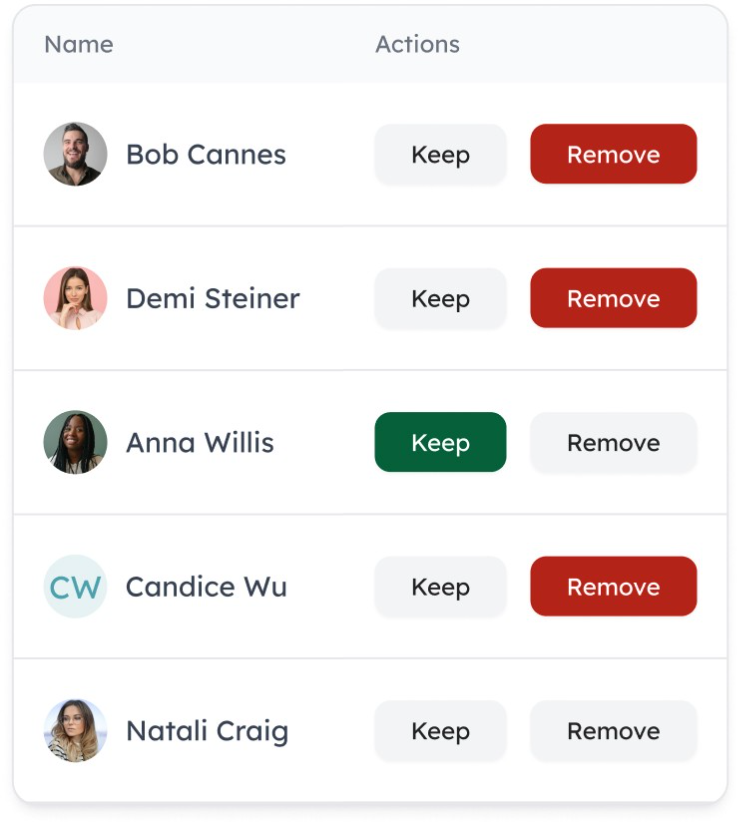
Orchestry assigns each guest an internal sponsor and sends that sponsor a review on a fixed cadence. The sponsor sees only the guests they are responsible for and chooses Keep or Remove for each one. Guests whose sponsor does not respond can be removed automatically, so access ends with the relationship and not whenever an admin gets to the list.
Workspace review policies give owners a recurring checklist for privacy, membership and links
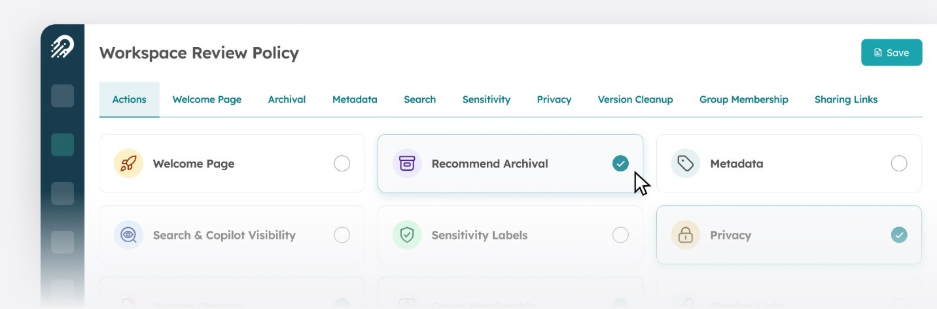
A workspace review policy puts the settings that drive oversharing in front of the workspace owner on a schedule: privacy, group membership, sharing links, sensitivity labels and Search and Copilot visibility, along with an archival recommendation for workspaces that have gone quiet. The owner confirms or fixes each item, and Orchestry escalates when the owner does not respond.
Frequently asked questions about Microsoft 365 oversharing
Microsoft 365 oversharing is content that more people can reach than the business intended. It happens through Anyone links that never expire, sites shared with “Everyone except external users”, guest accounts that outlived their project and permissions inherited from a parent site or template. Microsoft defines it as users having access to more data than their job requires.
Oversharing sets the blast radius of a compromised account. Verizon’s 2026 report found credential abuse somewhere in 39% of breaches and third-party involvement in 48%, so a phished user or a stale guest reaches everything the permissions allow. Microsoft 365 oversharing also decides what Copilot and other AI tools can surface, since they honor existing permissions.
No. Microsoft Learn documents the default SharePoint and OneDrive sharing level as “Anyone”, the default link type as “Anyone with the link” and link expiration as off, and Microsoft’s Copilot readiness guidance states that SharePoint sets sharing to the most permissive option by default. Anyone can create a Team unless creation is restricted. The defaults favor collaboration and have to be tightened deliberately.
“Everyone except external users” is a built-in SharePoint group containing every current and future internal user. It is added to public Teams and group sites automatically and is often placed in the Visitors group of intranet sites. Microsoft warns that sharing with it can lead to unintended data exposure, and SharePoint Advanced Management ships a report that lists the sites where it is in use.
Copilot makes existing oversharing reachable by letting a user ask a question across everything they already have access to, and it changes no permissions along the way. A June 2024 Gartner survey of 132 IT leaders found 40% had delayed Copilot three months or more over oversharing concerns and 57% had limited the rollout to low-risk or trusted users.
Run SharePoint Advanced Management’s data access governance reports: the site permissions snapshot, the sharing links report and the “Everyone except external users” report. Microsoft Purview’s Data Security Posture Management flags overshared sites holding sensitive data, and an Entra guest export with last sign-in dates covers external access. Start with sites that combine sensitive content and broad access.
SharePoint Advanced Management is included with a Copilot license and otherwise sold as an add-on; a Microsoft 365 E5 tenant can read its reports but gets no remediation actions. Without it, tenant and site sharing settings, Entra access reviews and PowerShell still cover discovery. What no license covers is the recurring owner follow-up, which is where purpose-built governance tools such as Orchestry fit.
Microsoft recommends running the sharing links and “Everyone except external users” activity reports monthly and the permissions snapshot quarterly. Review guests at least quarterly with a named sponsor per guest, and automate removal when the sponsor leaves or does not respond. Where anonymous links are allowed tenant-wide, closing the links matters more than any review cadence, because an Anyone link has no account to review.