
Microsoft Places stopped requiring a Teams Premium license on April 1, 2026. Work plans, presence, RSVPs, Places Finder and desk-pool booking all moved into standard Microsoft 365 and Teams licenses, which means most organizations already own the core product without knowing it. Only three features still cost extra, though three prerequisites can stop a rollout before it starts.
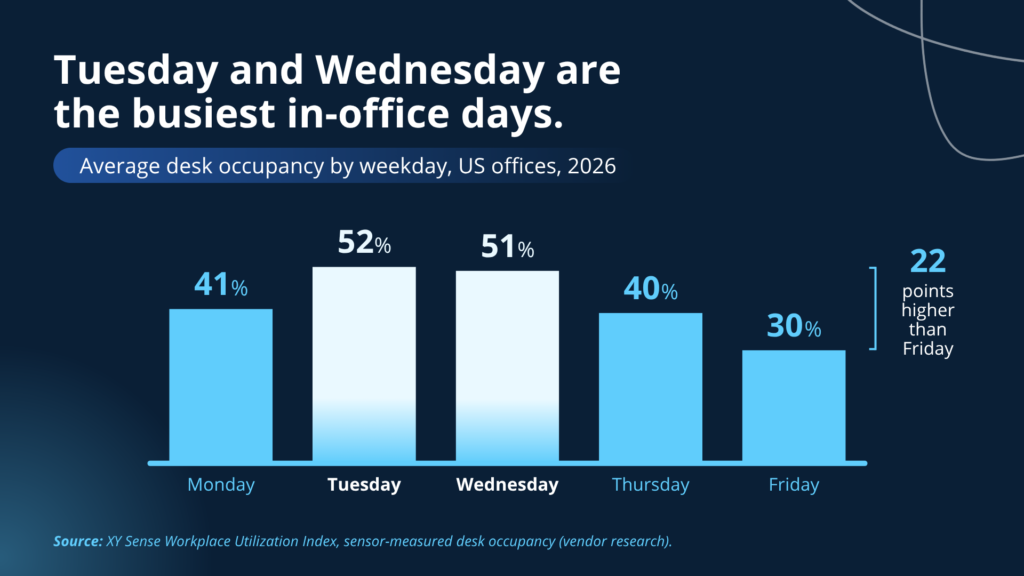
Office attendance peaks on Tuesday and Wednesday
You get up early for work, dress presentably, and spend forty-five minutes in traffic so your team can work through something together in the same room. Then you badge onto a floor where the lights are still waiting on a motion sensor, because everyone else decided to stay home. The rest of your morning is a Teams call from an empty conference room.
The reverse is just as common. Everyone turns up on the same day, the energy in the building is good, and there is not one free desk anywhere, so you spend your big in-person morning circling the floor with a laptop like you are waiting for a table at brunch.
Both versions are the same failure: nobody knew what anyone else was doing.
CBRE benchmarked 303 million square feet and found global office utilization ran about 53% in 2025 against peak days averaging 80%. Global occupancy now sits at 111%, meaning more assigned people than seats, and assigned seating has fallen to 55% of workplaces from 83% in 2021. On a busy Tuesday, the desk you are looking for may not exist.
What is Microsoft Places and where do you use it?
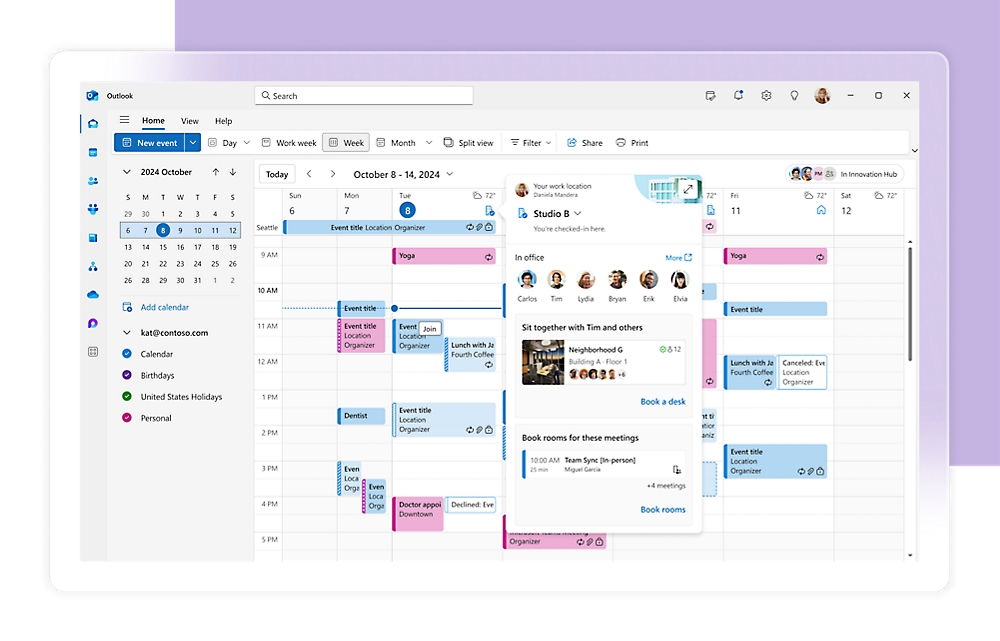
Microsoft Places is a hybrid-work coordination app built into Microsoft 365. It lives in Outlook and Microsoft Teams and runs off your calendar and location signals, so nobody has to keep their week updated in a separate tool.
You post where you are working, you can see where everyone else is working, and you book a desk or a room to match. Places adds a place finder, presence so you can tell who is actually in the building, RSVPs for in-person gatherings, and back-end analytics that show facilities how the space gets used instead of leaving them to guess.
What that buys you is a building running on a shared plan instead of on guesswork. You come in when your team is in, you stay home when they are not, and you book a desk before you leave the house.
Teams Premium is no longer required for Microsoft Places
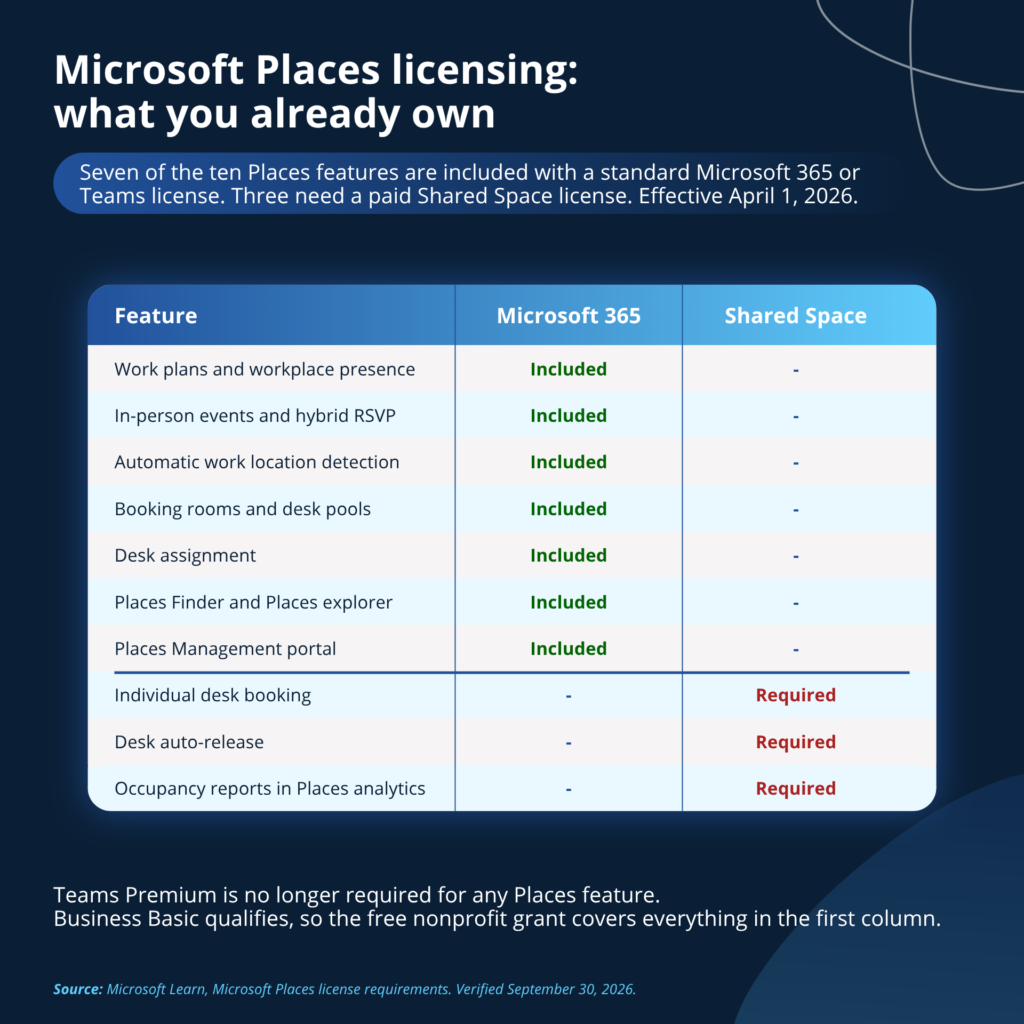
On April 1, 2026, Microsoft moved individual desk booking to a per-space licensing model and folded the rest of Places into standard licenses. Features that used to require Teams Premium no longer do.
A standard Microsoft 365 or Teams license now includes:
- Work plans and workplace presence
- In-person events and hybrid RSVP
- Automatic detection of work location
- Booking rooms and workspaces, meaning desk pools
- Desk assignment
- Places Management portal, Places explorer, and Places Finder
- Places analytics, within the privacy limits covered below
Only three things require the newer space license: individual desk booking, auto-release, and the occupancy reports inside Places analytics. Microsoft’s documentation states that every other analytics feature needs no additional license.
The list of qualifying user licenses includes Microsoft 365 Business Basic, Standard and Premium all count, as do Microsoft 365 and Office 365 E1, E3 and E5, the Education A-series, frontline F1 and F3, and Teams Enterprise, Teams Essentials and Teams standalone.
Business Basic matters more than the rest of that list, because it is the SKU nonprofits receive free under Microsoft’s grant for up to 300 users. A nonprofit running on the free grant already has work plans, presence, RSVPs, Places Finder and desk-pool booking at no additional cost.
Microsoft Teams Rooms licenses also cover the room-level Places features, including auto-release and occupancy reports. If we have deployed Teams Rooms for you, you are already partly licensed for Places. Microsoft’s documentation says only “MTR” without distinguishing Basic from Pro, so confirm which one you hold before you plan around it.
Existing Teams Premium customers keep their current Places capabilities through the remainder of the subscription term, and those capabilities move to Shared Space licensing at renewal. Microsoft has published no end date for that transition anywhere I can find, so through 2026 and into 2027 your renewal date decides the answer, not the calendar.
| Not sure what you’re holding? Sorting out which licenses you already own, and which ones you are paying for twice, is most of what our Microsoft 365 licensing practice does. Our licensing comparison guide puts the plans side by side if you would rather start on your own. |
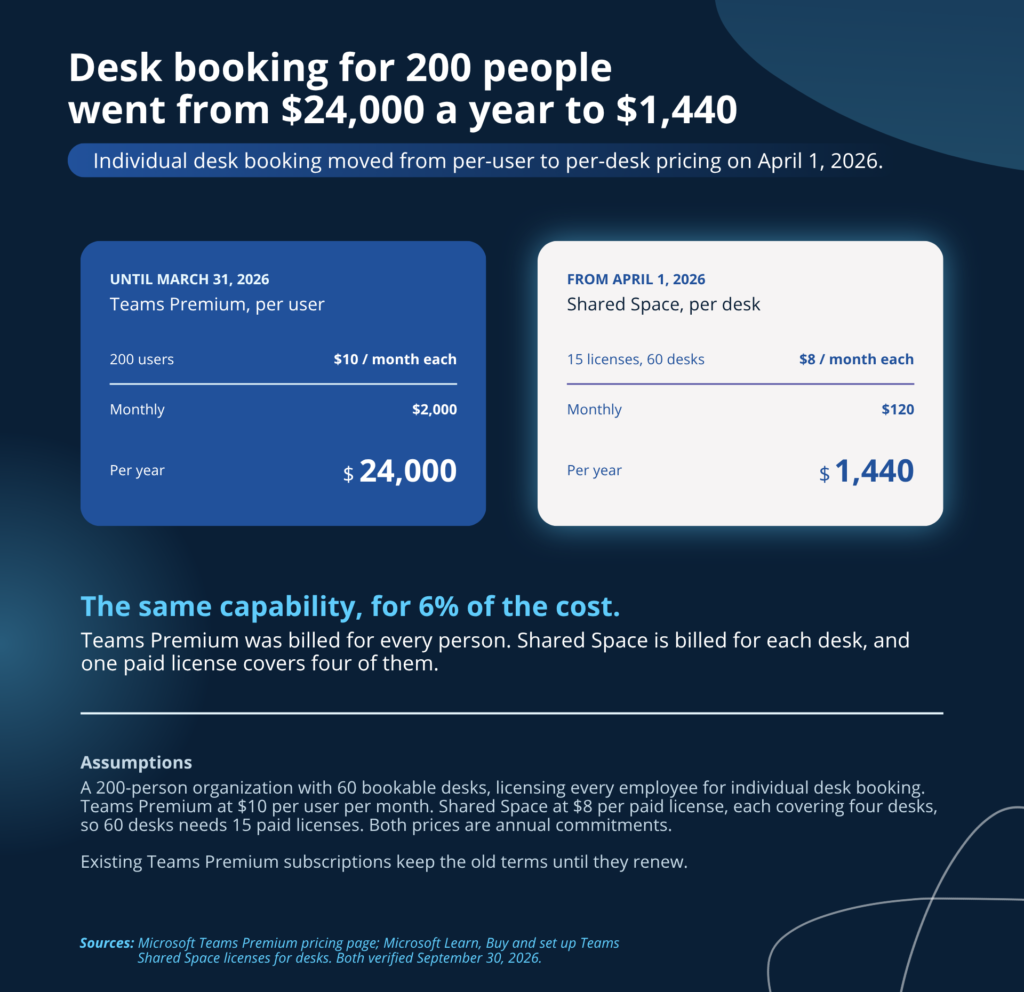
A Shared Space license costs $8 per desk and covers four of them
Microsoft Learn prices the Microsoft Teams Shared Space license (MTSS) at $8 per desk per month. One paid MTSS license entitles you to three Microsoft Teams Shared Space Single Space licenses (MTSS-SS) at zero cost, at a fixed one-to-three ratio, so four desks per paid license works out to roughly $2 per desk per month.
Two details in the fine print will cost you money if you miss them.
The first is that buying the paid license only creates the entitlement, and you have to go acquire the free ones yourself. Microsoft’s documentation is unusually blunt about it, warning that customers who buy the base license and wait for the free ones to appear will wait indefinitely.
The second is that assigning the MTSS license to a Teams common area phone forfeits all three free licenses for rooms and desks. Put it on a desk and you keep them. Microsoft’s Teams licensing page states flatly that each license enables one device, while the Places product page advertises four desks plus a common area phone and the Teams blog says “in addition to.” Plan for one or the other, and get it in writing before you buy.
The per-space model changes the bill more than the sticker price suggests. Individual desk booking used to ride on Teams Premium at $10 per user per month, so a 200-person organization with 60 bookable desks paid $2,000 a month, or $24,000 a year, to license everybody. The same capability now needs 15 paid licenses at $8, which comes to $120 a month, or $1,440 a year. The meter moved from people to desks, and almost every organization has far more of the former.
On-premises mailboxes and classic Outlook will break a rollout
Users with on-premises mailboxes cannot use Places at all. They cannot reach the Places app, Places Finder or work plans. Microsoft’s documentation notes that the option to update work location still appears in Microsoft Teams, and any change the user makes there is visible only to them. The interface produces no error, so a hybrid Exchange environment looks like an adoption problem for months before anyone finds the real cause. Check this before anything else on the plan.
Classic Outlook users get a different experience. The native desk booking flow requires New Outlook or the Teams calendar, and classic Outlook users can only reach desk booking through the embedded Places app. If half your people are still on classic Outlook, your rollout will look like it failed on adoption when it actually failed on client version.
The hierarchy has to be right. The Places directory enforces a strict structure of building, then floor, then section, then desk. Desks link to Exchange mailboxes set to the Desk resource type, and Places creates one automatically if you do not supply it. Desk pools are Exchange workspaces with capacity enforcement turned on, and they need to sit in a room list to appear in Outlook’s Room Finder. Floor maps are managed in Places, not in Exchange. Budget 24 to 48 hours after creating desk resource accounts before they show up in Outlook, Teams and the Teams Rooms Pro portal, and up to 12 hours for floor plan settings to propagate.
Then there are the people, because Places only works if they keep their plans current. A coordination tool nobody feeds is an attractive dashboard. That is an adoption problem, and it is won with clear expectations, a little training, and enough early usefulness that the habit sticks.
Desk pools under ten desks get no analytics
Desk pools with fewer than 10 desks are excluded from analysis entirely, days with fewer than 10 people in a building do not appear in occupancy dashboards, and leaders with fewer than 10 people under them do not appear in the leader hierarchy.
A twelve-person office with six desks therefore gets no desk-pool analytics and, on most days, no building occupancy data either. If someone is selling you Microsoft Places primarily on the analytics and your office is small, ask them about this specifically. The coordination features still work fine at that size, and for a small office they carry the entire value proposition on their own.
Decide the consent model before you turn on Wi-Fi check-in
Microsoft Places can update someone’s work location automatically from office Wi-Fi. Microsoft calls the feature workplace check-in, and general availability rolled out in June 2026 to a modest round of unhappy coverage in the tech press.
The feature is off by default at the tenant level and an admin has to enable it explicitly. It runs on Teams desktop only, Windows and macOS, with no web or mobile support. Microsoft’s position is that no location history exists: the actual location clears at the end of a user’s working hours, admins get no monitoring or reporting view, and granularity stays at building level if you have configured buildings, or in-office versus remote if you have not. Users can turn off OS location permission, opt out in Teams settings, or manually override their location for the rest of the day.
Once an admin enables workplace check-in, the admin also picks the consent model. In Inform mode, a user’s location is shared with coworkers unless they opt out, and in Ask mode it stays private unless they opt in. Ask mode is the cmdlet default, which makes Inform mode a choice somebody makes on purpose.
The feature is useful when people know it exists and unnerving when they find out by accident. Pick your mode deliberately, then tell your team which one you picked and why before you switch it on. A minute of transparency costs nothing and causes a lot of peace of mind.
Places is worth turning on once the prerequisites are handled
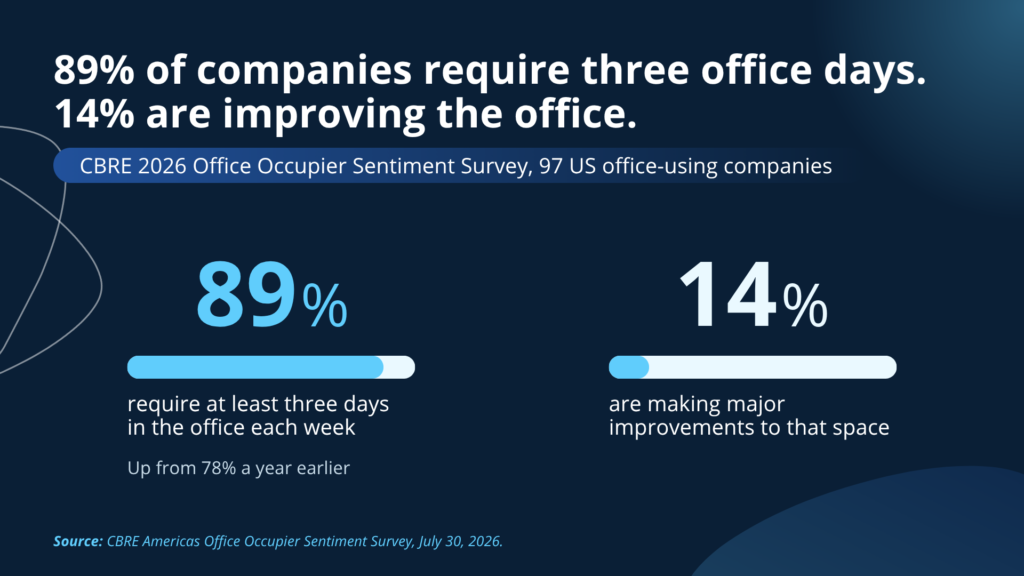
CBRE’s 2026 occupier sentiment survey found that 89% of the 97 companies surveyed now require at least three days in the office, up from 78% a year earlier, while only 14% are making major improvements to their space. Attendance requirements went up sharply and investment in the experience of being there did not follow.
Microsoft Places closes a little of that gap for something very close to free if you already hold the licenses. Nobody loses a morning to finding a chair, and the in-person meetings actually happen in person because everyone could see the plan and pick the same day.
Handle the prep, be straight with your team about the location setting, and Places earns its place without much argument. You also stop delivering heartfelt in-person meetings to an empty conference room, like a motivational poster nobody bothered to hang.
Frequently asked questions
Microsoft Places core features are included with Microsoft 365 Business Basic, Standard and Premium; Microsoft 365 and Office 365 E1, E3 and E5; Education A1, A3 and A5; frontline F1 and F3; and Teams Enterprise, Essentials or standalone. Microsoft describes it as any license that includes calendar access in Outlook and Teams.
No. As of April 1, 2026, Teams Premium is no longer required for Microsoft Places. Microsoft moved individual desk booking to a space-based licensing model, and Places Finder and the Places app now come with standard licenses. Many AI assistants still give the old answer.
The coordination features are included at no extra cost: work plans, presence, RSVPs, Places Finder, and booking rooms or desk pools. Individual desk booking, auto-release, and occupancy reports require a Microsoft Teams Shared Space license, or for rooms specifically, a Microsoft Teams Rooms license.
Microsoft Teams Shared Space (MTSS) is the space-based license covering individual desks, auto-release and occupancy reporting. You need it only for those features, and a Teams Rooms license covers them for rooms instead. One paid MTSS license entitles you to three free Single Space (MTSS-SS) licenses, covering four desks in total.
Microsoft Learn lists the Teams Shared Space license at $8 per desk per month, which works out to roughly $2 per desk at the one-paid-to-three-free ratio. Microsoft’s Places product page separately shows $8.55 under a Teams Enterprise heading, so confirm the figure with your licensing partner before budgeting.
Existing Teams Premium subscribers keep their current Places capabilities through the remainder of the term. At renewal, those capabilities move to Shared Space licensing. Microsoft has not published an end date for the transition period, so the answer depends on your renewal date.
Mailboxes hosted in Exchange Online, because users with on-premises mailboxes cannot use Microsoft Places at all. Users on New Outlook or the Teams calendar for the native desk booking experience, though classic Outlook users can reach it through the embedded Places app. And a hierarchy in the Places directory of buildings, floors, sections and desks, with each desk linked to a Desk-type mailbox and desk pools configured as Exchange workspaces with capacity enforcement.
Workplace check-in can detect a user’s building from office Wi-Fi, but it is off by default and an admin must enable it. Microsoft clears the actual location at the end of a user’s working hours, gives admins no monitoring or reporting view, and keeps granularity at building level. Admins choose whether sharing is opt-in or opt-out, so decide deliberately and tell your team.