Microsoft 365 governance is the set of decisions, owners and routines that control how Teams and SharePoint workspaces get created, who can access what, how long content lives and what AI tools are allowed to read. It sits above the security controls. The controls enforce the decisions; governance is the work of making them, assigning each one to an owner and checking that they still hold.
In brief
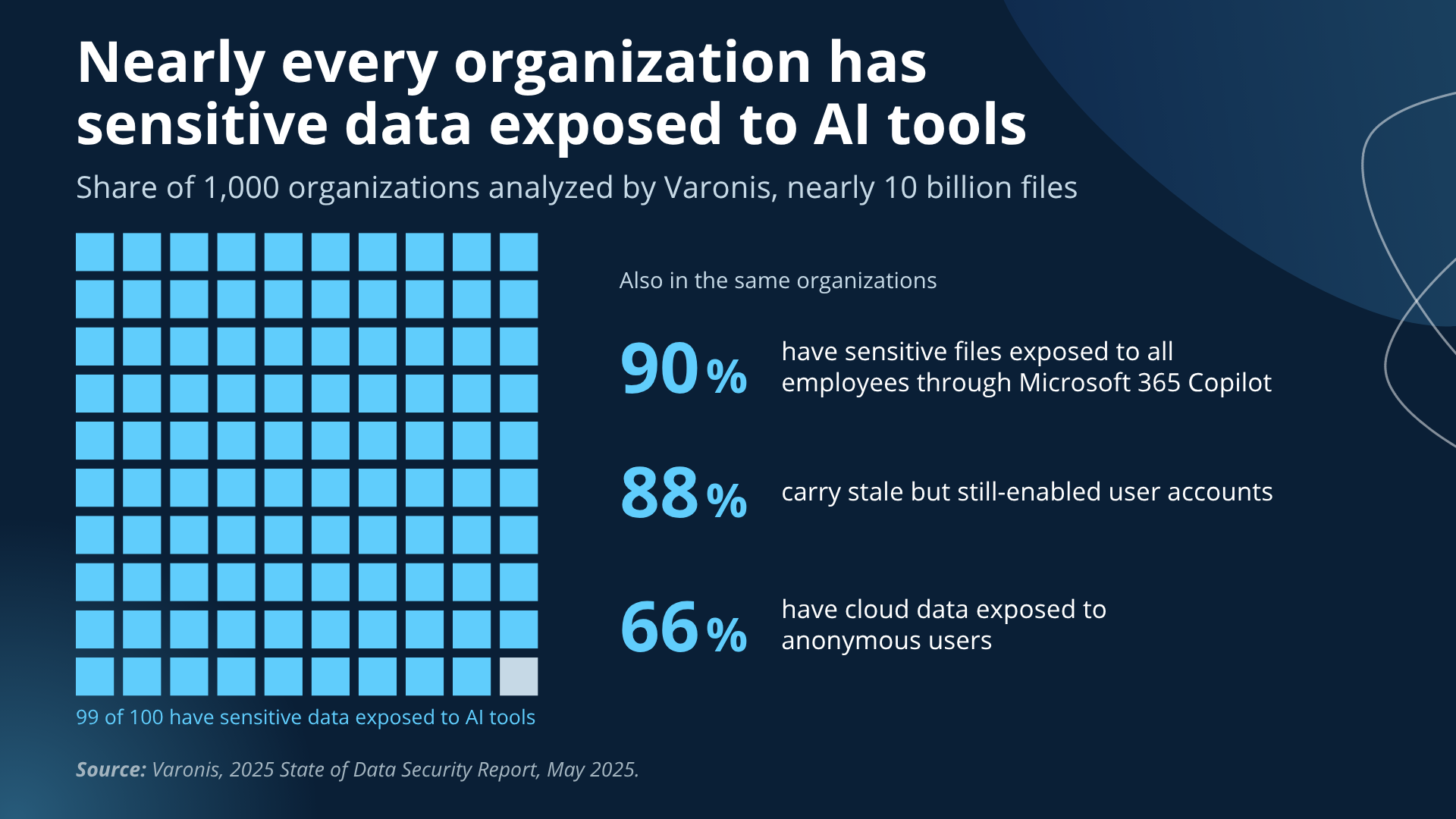
- 99% of organizations have sensitive data exposed to AI tools, 88% carry stale but still-enabled accounts and 66% have cloud data exposed to anonymous users (Varonis, 2025, 1,000 organizations).
- Most tenants were built by accumulation: migrated, tightened once after an incident, then left to grow.
- Microsoft 365 governance has four parts: ownership, data and access, external sharing and lifecycle, and AI readiness. Native Microsoft tools cover discovery in each; enforcement is where midsize IT teams run out of hands.
- Copilot raised the stakes because it makes every existing permission reachable with a question. 40% of IT leaders delayed rollout over oversharing (Gartner, 2024).
Each of the four governance domains below ends with a “What good looks like” paragraph to hold your own tenant against. The comparison table shows where Microsoft’s native tools stop and where Orchestry, the Microsoft 365 governance platform Apex Digital deploys and manages, picks up, and the maturity table and starting order turn the findings into a sequence. By the end you will be able to place your tenant in one of three states, name an owner for each domain, and know which fixes come first.
Microsoft 365 governance decides who owns what, who can see it and how long it lives.
Microsoft 365 governance covers Teams, SharePoint, OneDrive, Exchange, Entra ID, Purview, Power Platform and Copilot as one environment, because content moves between them naturally.
Governance and security often get confused because the same admin usually does both. Here’s how to differentiate them:
Security is the controls: multifactor authentication, Conditional Access, Defender, data loss prevention.
Governance is the ownership and the proof: who decided those controls, who reviews them, and whether anyone can show that the right people, and only the right people, have access today.
A tenant can pass a security checklist and have no answer to the second set of questions.
Midsize organizations, roughly 50 to 2,000 seats, carry a specific version of the problem. Nobody has governance in their title, so the work belongs to whoever set up the tenant, and it competes with every project the business asked for.
Nearly every organization has sensitive data exposed to AI tools.
Varonis’s 2025 State of Data Security Report, drawn from 1,000 organizations and nearly 10 billion files, found 99% of organizations had sensitive data exposed to AI tools. 88% carried stale but still-enabled user accounts, 66% had cloud data exposed to anonymous users, and 90% had sensitive files exposed to all employees through Microsoft 365 Copilot.
The same report found 98% of organizations had unverified apps in use, including unsanctioned AI, and only one in ten had labeled their files. Microsoft’s own Data Security Index found data security incidents tied to AI applications rose from 27% of organizations in 2023 to 40% in 2024. In the tenants we assess, the exposure persists because of overconfidence in how well governed the environment is; a team that believes the tenant is fine does not go looking.
Most Microsoft 365 tenants were built by accumulation.
Gartner predicted in 2019 that through 2025, 99% of cloud security failures would be the customer’s fault, and the years since have borne that out. The risk in Microsoft 365 lives in what was set up at migration and then left to grow as people, projects and sharing links came and went.
Accumulation can look like the following:
- Anyone can create a Team, because that was the default.
- Sharing links were set to Anyone and never expire.
- Guests were added for a project in 2022 and nobody removed them when it ended.
- Sites inherited company-wide permissions from a parent nobody remembers configuring.
Orchestry applies Microsoft 365 governance standards when a workspace is created.
Orchestry is a Microsoft 365 governance platform that applies an organization’s standards to Teams and SharePoint workspaces from the moment each one is created. Requests for a new workspace go through Orchestry templates, and each template sets the owner, sensitivity label, naming convention and external sharing level as the workspace is built. Lifecycle policies then flag the workspaces that go quiet and archive them on a defined clock.
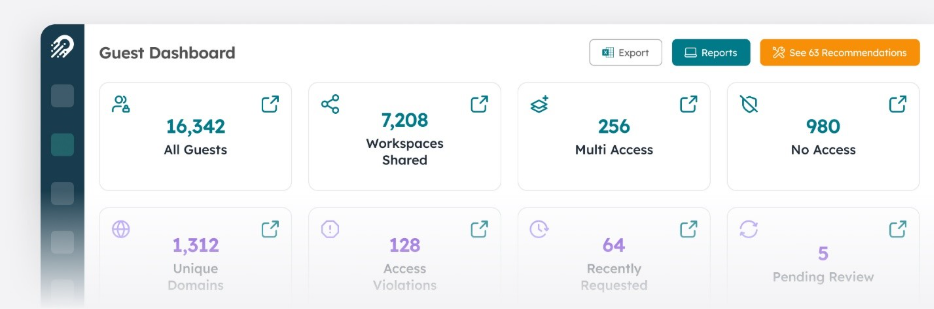
Guest and access reviews in Orchestry recur on a schedule and escalate when an owner does not respond, and ownership reporting shows every workspace and its accountable owner in one view. Orchestry runs on top of the native reports from SharePoint Advanced Management, Purview and Entra and adds the enforcement those reports leave to an admin.
Apex Digital deploys and manages Orchestry for midsize organizations as part of its Microsoft 365 governance service. Apex Digital assesses the tenant and writes the standards with the organization’s governance owner, and Orchestry keeps applying those standards long after the assessment ends.

Microsoft 365 governance starts with ownership, and most tenants cannot name an owner.
One person owns the standard and every workspace has a named owner.
Ownership means one named person is accountable for the governance standard and every Team and SharePoint site has a named business owner responsible for its membership and content.
Gartner predicts that by 2027, 80% of data and analytics governance initiatives will fail for lack of a real or manufactured crisis, which is a formal way of saying governance stalls when nobody owns it and nothing forces the issue.
Ask IT, security, compliance and legal who owns Microsoft 365 governance and the answers often differ. Shared ownership across departments without assignment to a person is how a standard goes unreviewed for three years.
| What good looks like: one named owner for the standard, usually in IT with security and compliance as reviewers; a named owner on every workspace, enforced through Microsoft’s ownerless group policy with Orchestry’s ownership reporting as the rollup; and a review cadence that appears on a calendar, with dates. |
The footprint grows faster than the people governing it.
Microsoft 365 passed 450 million paid commercial seats in January 2026, and the AI layer on top of it is growing faster still: Microsoft 365 Copilot went from 15 million paid seats in January 2026 to more than 30 million by July 2026. The platform most organizations adopted for Exchange and file storage now holds Teams conversations, Power Platform apps, Loop workspaces and an AI layer that reads across all of it.
Governance has to scale with that footprint or it lags it. A midsize tenant that adds forty Teams a quarter with no provisioning standard has created forty new ownership, sharing and lifecycle decisions that nobody made on purpose.
| What good looks like: the owner can name every workload in use, state roughly how many Teams and SharePoint sites exist and say how many were created this quarter, with the numbers coming from a report. |
Data governance in Microsoft 365 means knowing where sensitive data lives and who can reach it.
The data that would hurt most if exposed usually sits in the sites that have accumulated permissions the longest, so the inventory and the access report have to be built together.
A data map with guesses in it raises the cost of a breach.
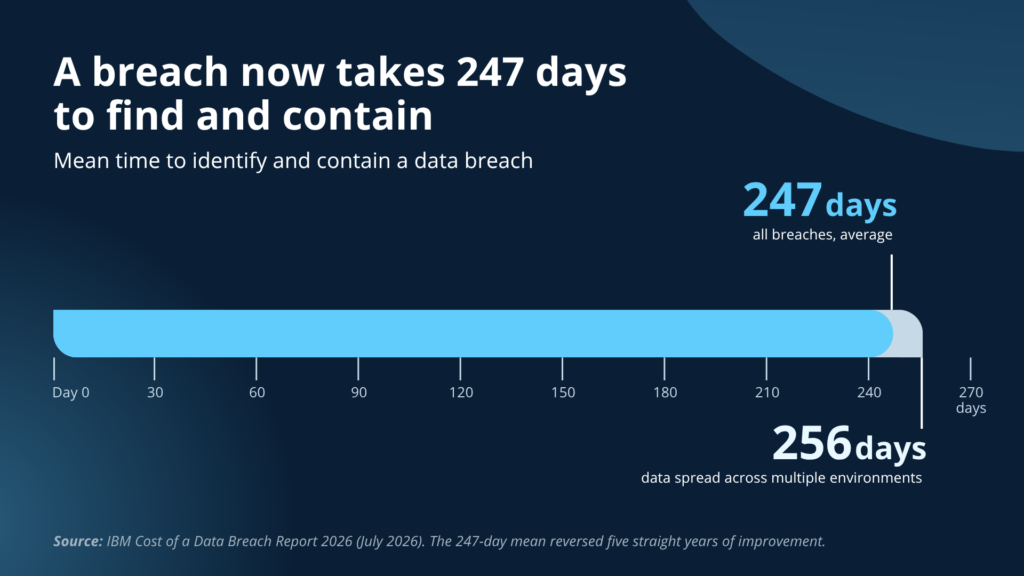
Data governance begins with an inventory of where business data lives, across Microsoft 365, on-premises systems, other SaaS platforms, personal devices and email. IBM’s 2026 Cost of a Data Breach Report found breaches involving data spread across multiple environments took the longest to identify and contain, at 256 days against a 247-day average. The timeline cannot be shortened for data nobody located.
| What good looks like: an inventory of every system that holds business data, with an owner per system and a flag on the ones that hold regulated or sensitive records. Microsoft 365 mapped and everything else remembered is the common halfway point. |
Sensitivity labels only protect the data they reach.
Labeling is how Microsoft 365 knows which content is sensitive, and most tenants have labels defined and sparsely applied.
The global average breach cost reached $4.99 million in IBM’s 2026 report, a record. Concentric AI’s Data Risk Report, published in early 2023, found 16% of business-critical files were visible to internal or external users who should not have had access. The data that hurts most when it leaks is usually customer records, financials, intellectual property, employee data and contracts, and those categories tend to live in the sites that accumulated permissions over the longest time.
Labels applied at upload by whoever uploads the file drift immediately. Labels applied at the site or Team level, set when the workspace is created, travel with the content and support the Purview policies that decide whether Copilot can use it.
| What good looks like: the owner can name the five data categories that matter most, say which sites and libraries hold them and confirm a sensitivity label is applied at the container level for each. |
Answering “who can see this” should be a report.
Access visibility is the ability to produce, on demand, a list of who can reach a given site and how. The same Concentric AI report put the average organization at roughly 802,000 files at risk from oversharing.
The tooling exists inside Microsoft 365: SharePoint Advanced Management’s data access governance reports flag sites shared with Everyone except external users, sites with large numbers of sharing links and sites with no owner, and Microsoft Purview’s Data Security Posture Management surfaces overshared sites that hold sensitive data. Our walkthrough of how to secure Copilot before rollout covers the sequence Microsoft recommends.
Running the reports is the easy half. Acting on them means a site owner removing excess groups, rescoping links and fixing broken inheritance, one site at a time, which is why the reports in most tenants are run once before a Copilot pilot and not again. Tenants running Orchestry keep a rolling view of sharing links and site access instead, so the review recurs without an admin re-running the report.
| What good looks like: a report that could be pulled today showing site-level access, sharing links and broad-audience exposure for every site holding sensitive data, with a named owner responsible for acting on it. |
External sharing and workspace lifecycle are where sprawl accumulates.
Guests and workspaces get added one at a time for good reasons and removed almost never, which is why both numbers below surprise IT leaders the first time they see them.
Nearly half of breaches now involve a third party.
External sharing governance covers guest accounts, sharing links and the per-site settings that decide who outside the organization can reach what. Verizon’s 2026 Data Breach Investigations Report found 48% of breaches now involve a third party, up 60% in a single year. Every vendor, partner and guest account is part of the attack surface whether or not anyone manages it, and Varonis’s 2025 finding that 88% of organizations carry stale but still-enabled accounts, about 15,000 per organization, shows how rarely anyone does.
Guests who never redeemed their invitation are the usual blind spot. They have no sign-in record, so they never appear in an inactivity report, yet the access grant is live and will work the day someone clicks it.
| What good looks like: the guest count is known; Entra access reviews or Orchestry’s guest review policies run on a schedule; sharing links expire by policy; external sharing is set per site, with the sites that hold sensitive data locked down, instead of one tenant-wide setting. |
Two in three workspaces are already inactive when someone finally looks.
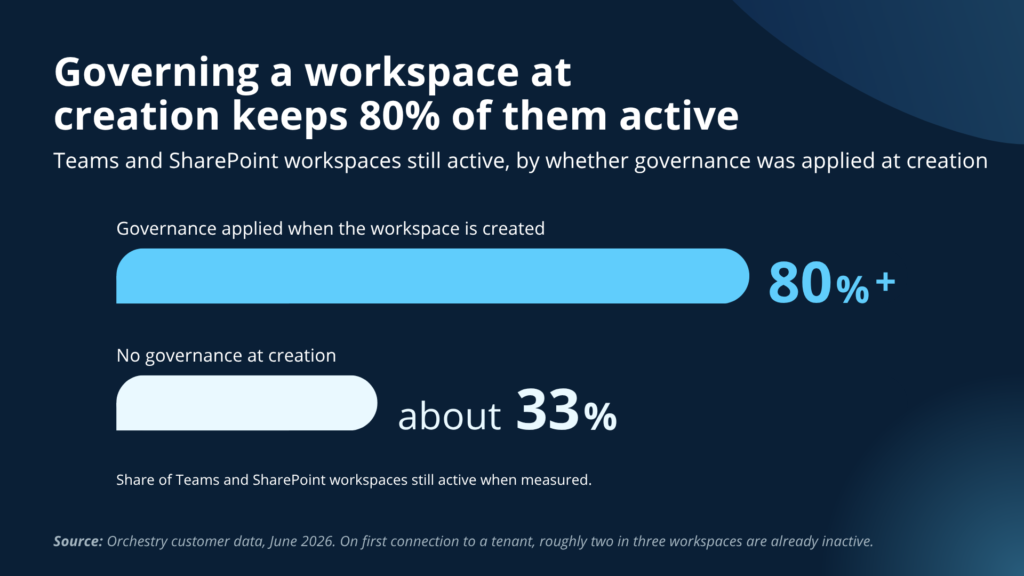
Lifecycle governance decides what happens to a Team or site after the work that created it ends. When Orchestry first connects to a tenant, roughly two in three Teams and SharePoint workspaces are already inactive, according to Orchestry customer data from June 2026. The same data shows the other side: tenants that apply governance at the moment a workspace is created keep more than 80% of their workspaces active, against roughly one-third in tenants that do not.
Old data costs more to protect, more to store, more for Copilot to reason over and more to produce in discovery. It also carries the permissions it accumulated while it was active, which is how a 2021 project site becomes a 2026 exposure.
| What good looks like: inactive workspaces are flagged automatically, owners are asked, and sites are archived or deleted on a defined clock, whether through SharePoint Advanced Management’s inactive site policy, Microsoft 365 Archive or Orchestry’s lifecycle policies. Storage alerts as the trigger is the sign that lifecycle is being handled by accident. |
AI readiness is Microsoft 365 governance under a new name.
Whether or not Copilot is licensed, AI tools are reading tenant data today through whatever permissions and paste-into-a-browser habits already exist, so the readiness work is the same governance work with a deadline attached.
Shadow AI tripled in a year and most of it is invisible to IT.
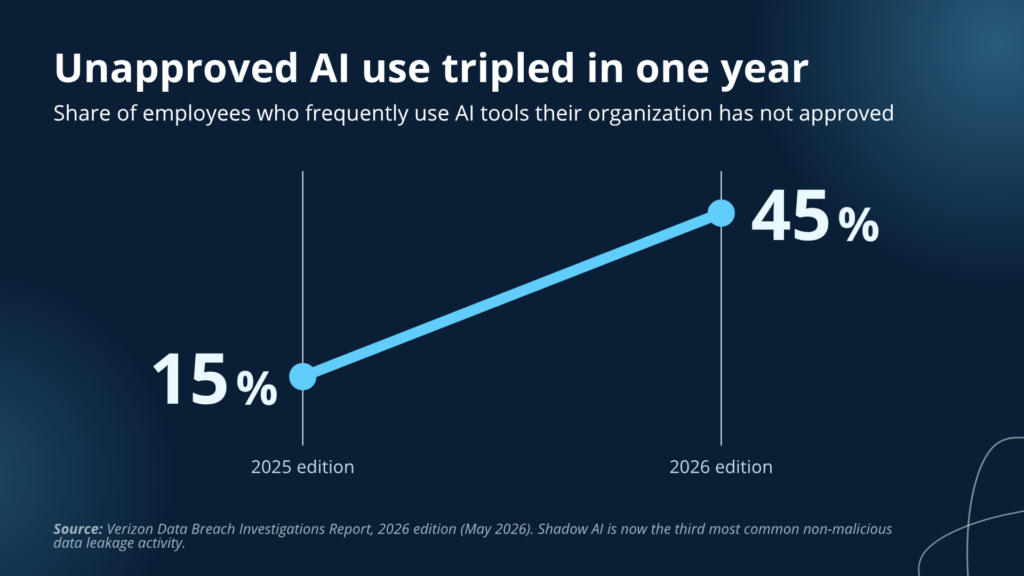
AI governance starts with knowing which AI tools are in use, sanctioned or not, and what data they touch. Frequent employee use of unapproved AI tools jumped from 15% to 45% of employees in one year, according to Verizon’s 2026 report, which ranks shadow AI as the third most common way company data leaks without anyone intending harm. IBM’s 2026 report found shadow AI figured in 43% of security incidents, more than double the prior year, and those incidents cost more than the average breach.
| What good looks like: an approved-tools list people have read, a data loss prevention policy that covers pasting or uploading to AI services, and a way to see which AI apps are in use through Microsoft Defender for Cloud Apps or similar. |
Copilot makes every existing permission reachable with a question.
The exposure Copilot creates is reach: a user who would have needed to know which site to open and what to search for can now ask a plain-English question across everything they already have access to, including permissions nobody has reviewed in years.
In a June 2024 Gartner survey of 132 IT leaders, reported by Computerworld, 40% said oversharing concerns had delayed their Copilot rollout by three months or more, and 57% limited the rollout to low-risk or trusted users.
Microsoft’s own deployment blueprint puts the work in order:
- Remediate oversharing
- Set guardrails that hold after launch
- Meet audit and retention requirements
Restricted Content Discovery can hide high-risk sites from Copilot while cleanup runs, but Microsoft is explicit that it is a containment tool and does not change the underlying permissions.
| What good looks like: an oversharing assessment has been run, the high-risk sites have been remediated or placed under Restricted Content Discovery while cleanup finishes, and the pilot group was chosen by data risk, not by seniority. |
AI projects fail on data readiness before they fail on models.
Gartner predicts organizations will abandon 60% of AI projects unsupported by AI-ready data through 2026, and its 2024 survey of data management leaders found 63% of organizations either do not have, or are not sure they have, the right data management practices for AI. In Microsoft 365 terms, AI-ready data means the permissions are right, the labels are applied at the container level and the stale content is archived before the tool is switched on.
| What good looks like: every AI initiative on the roadmap has readiness criteria on record, naming the data sources it will read, the labeling those sources need and the access review that happens before go-live. |
Native Microsoft tools cover discovery, and enforcement is where midsize teams need help.
Microsoft now ships most of what a tenant needs to find its governance problems. SharePoint Advanced Management reports oversharing, inactive sites and ownerless sites and can enforce an inactive site policy.
Purview handles labels, data loss prevention and posture reporting.
Entra runs access reviews and ownerless group policy.
Secure Score covers the identity baseline.
What these tools leave to the admin is the enforcement: provisioning standards at workspace creation, lifecycle automation across Teams and sites, and the owner follow-up that turns a report into a fixed permission. Almost none of the midsize tenants we assess run a purpose-built governance tool, which is one explanation for why the same findings repeat.
| Governance need | Native Microsoft capability | What it leaves to the admin | Where a purpose-built tool fits |
|---|---|---|---|
| Find overshared sites | SharePoint Advanced Management data access governance reports; Purview Data Security Posture Management | Remediation is manual, site by site, through site owners | Owner-driven access reviews and tracked cleanup |
| Control how workspaces get created | Group creation restriction; naming policy; sensitivity labels at creation (licensing varies) | Request, approval and templating require scripting or forms | Templates that set owner, label, naming and sharing by default |
| Retire inactive workspaces | SharePoint Advanced Management inactive site policy; Microsoft 365 Archive | Owner follow-up and coverage across Teams and standalone sites | Lifecycle automation with archive and delete on a defined clock |
| Govern guest access | Entra access reviews; inactive guest insights (licensing varies) | Setup, licensing, and never-redeemed guests that skip inactivity reports | Guest reviews and expiry applied across every workspace |
| Keep every workspace owned | Ownerless group policy emails candidate owners | No rollup of what is still ownerless | Ownership reporting and reassignment in one view |
Governed tenants look different in four places.
Three states describe nearly every tenant we assess.
Built by accumulation means settings are whatever migration left behind plus whatever got tightened after an incident, ownership is informal and nobody can produce an access report for the sites that matter.
Deliberately configured means someone tightened the tenant on purpose and documented some of it, but proving the controls still hold takes a project and cleanup is manual.
Actively governed means standards are written, owned and reviewed, and access and lifecycle are reported on a cadence, so the open question is drift, not foundation.
| Domain | Built by accumulation | Deliberately configured | Actively governed |
|---|---|---|---|
| Ownership | Nobody is sure who owns governance | IT owns it informally | Named owner for the standard, named owner per workspace, calendar cadence |
| Data and access | Sensitive data locations are known from memory | Labels applied on the main sites | Container-level labels; access reports for sensitive sites on demand |
| Sharing and lifecycle | Guests and sites accumulate until storage complains | Periodic manual cleanup | Access reviews and lifecycle policy run on schedule |
| AI readiness | Shadow AI unmeasured; Copilot on hold | Copilot pilot for trusted users | Readiness criteria per tool; oversharing remediated first |
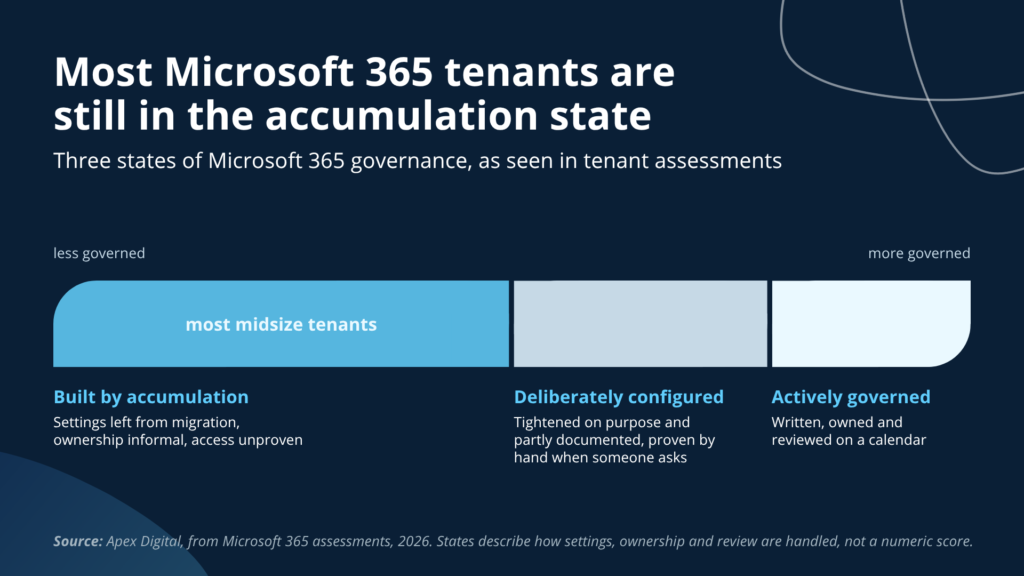
Most midsize tenants sit in the first column, and the move to the second is mostly a matter of writing down and assigning what already exists. The move to the third is where automation and tooling start to pay for themselves.
Starting Microsoft 365 governance follows an order.
Discovery comes first, because every other decision depends on what the tenant contains. Run SharePoint Advanced Management’s content and access assessments, Purview’s posture reports and an Entra guest inventory, and start with the sites that combine sensitive content with broad access.
Our guide to what a Microsoft 365 assessment covers describes what that pass produces when someone runs it for you, and the 7 hidden Microsoft 365 gaps post covers the findings that show up most often.
Standards at creation come second. The cheapest place to stop sprawl is the moment a workspace is created, which means provisioning templates that set ownership, sensitivity label, naming and external sharing by default, and lifecycle rules that archive what goes quiet. This is the layer where a purpose-built tool earns its cost, because the alternative is an admin enforcing the standard by hand against forty new Teams a quarter.
Keeping it running comes last and never ends. Microsoft changes the platform monthly, people change roles weekly, and a standard nobody reviews drifts back toward accumulation within a year. Our post on what a year of unmanaged Microsoft 365 looks like walks through that drift month by month.
Frequently asked questions about Microsoft 365 governance
Microsoft 365 governance is the set of decisions, owners and routines that control how workspaces are created, who can access what, how long content lives and how AI tools are allowed to use it. It treats Teams, SharePoint, OneDrive, Exchange, Entra ID and Copilot as one environment. Security tools enforce the decisions; governance is deciding them and checking they still hold.
Security is the controls: multifactor authentication, Conditional Access, Defender, data loss prevention. Governance is the ownership and the proof: who decided the controls, who reviews them, and whether anyone can show that the right people, and only the right people, have access today. A tenant can pass a security checklist and still have no owner for its sharing settings.
No. Microsoft secures the platform and honors the permissions you set, but default tenant settings favor ease of collaboration: anyone can create a Team, external sharing is broadly allowed and sharing links do not expire. Gartner’s long-standing estimate that 99% of cloud security failures are the customer’s fault is about those defaults being left in place.
A working framework covers four domains: ownership (who owns the standard and each workspace), data and access (where sensitive data lives, how it is labeled and who can reach it), external sharing and lifecycle (guests, sharing links, inactive workspaces and retention) and AI readiness (which tools are approved and what cleanup happens before Copilot). Each domain needs a named owner, a written standard and a review cadence.
Native tools now cover discovery well. SharePoint Advanced Management reports oversharing, inactive sites and ownerless sites, Purview handles labels and data loss prevention, and Entra runs access reviews. What native tools do not do for a midsize IT team is enforce standards at workspace creation and automate lifecycle without scripting, which is where purpose-built tools such as Orchestry fit. Few midsize organizations run one today.
Review access to sensitive sites and guest accounts quarterly, review the governance standard itself at least annually, and review again after any incident, merger, leadership change or major Microsoft platform change. Workspace lifecycle checks should run continuously through policy, without depending on a person remembering.
Copilot can only return content a user already has permission to see, so it inherits every permission mistake in the tenant and makes it reachable with a question. Oversharing that was theoretical when it took a search to find becomes practical. Microsoft’s deployment guidance puts oversharing remediation first for that reason, and 40% of IT leaders in a 2024 Gartner survey delayed Copilot over it.
One named person should own the standard, usually in IT with security and compliance as reviewers, and every Team and SharePoint site should have a named business owner responsible for membership and content. Governance programs fail when ownership is shared across departments without being assigned to anyone.
Start with the sites that hold the data that would hurt most.
Pick the five sites or Teams that hold the data whose exposure would hurt most, run SharePoint Advanced Management’s access report and Purview’s posture report against them, and name an owner for each before the week is out. That single pass surfaces the Everyone except external users permissions, the never-expiring links and the guests from finished projects, and it gives the owner five concrete things to fix.
The cleanup that moves the rest of the tenant out of the accumulation state is laid out in the Executive’s Guide to Getting Ready for Microsoft 365 Copilot: ownerless and inactive workspaces, sharing links nobody has rescoped, guest accounts nobody has reviewed and the provisioning defaults that keep creating more of each.