
Three IT priorities come up in almost every conversation I have with midsize companies right now: a phone system nobody wants to own, AI that everyone uses and almost nobody was trained on, and an environment nobody can fully map. They look like three separate problems, but, really, they share a cause and they share a fix.
Over the past few months I’ve sat in a lot of rooms. Different industries, different headcounts, different levels of confidence about how well things are actually running. The same handful of themes kept surfacing, close to word for word, in conversations that had nothing else in common.
These may not necessarily be emergencies, but allowed to compound, these problems can cause major headaches or risks in the long term.
The phone system that needs a check-up from the neck up
The phone system works. Technically. Then you start asking questions and it turns out to be a patchwork: some aging on-prem gear, a little cloud bolted onto the side, forwarding rules configured by someone who left two reorgs ago, and a voicemail tree nobody fully understands. Everyone knows touching it is risky, so nobody touches it. It is the closet server’s chatty cousin.
Telephony became critical infrastructure without anyone deciding it should be, and most organizations cannot say what is actually holding it up.
There are some serious deadlines to consider:
Cisco’s Unified Communications Manager 12.5 passed its last date of support on August 31, 2025. If that is what is in your rack, you are running unsupported voice infrastructure today, not eventually.
Meanwhile the migration is further along than most people realize and less far along than the vendors imply. Microsoft Teams Phone went from 20 million PSTN users in April 2024 to more than 26 million by the end of 2025. Cavell Group’s research director puts that at roughly 6% penetration of Microsoft’s 350 million-plus Teams users. Most companies are running Teams for everything except the phone call.
Moving to something modern gets you three things that matter more than the technology itself. You find out what you own. You retire the parts that are only costing you money and risk. And you stop sending a senior engineer to a branch office to reboot a box that time forgot. If your call flows are the complicated part, the Queues app in Teams now covers most of what people used to need a separate contact center product for.
Modernizing the phone system wins zero style points in a board deck. It also stops being the thing that embarrasses you at the worst possible moment. A family services nonprofit we work with in Metro Detroit was running exactly that Cisco platform. They lost voicemail, then lost the ability to forward certain numbers to cell phones, and then the main public line stopped receiving calls entirely. Here is what the move looked like for them.
| Not sure where your phone system stands? Our Phone System Audit Guide walks you through a 30-minute self-audit, a 0-to-30 scoring model, and a true-cost worksheet, so you can have the internal conversation before you have the vendor one. |
Everyone is using AI. Almost nobody has been trained on it.
This is the most consistent thing I have heard all year, and it is not close.
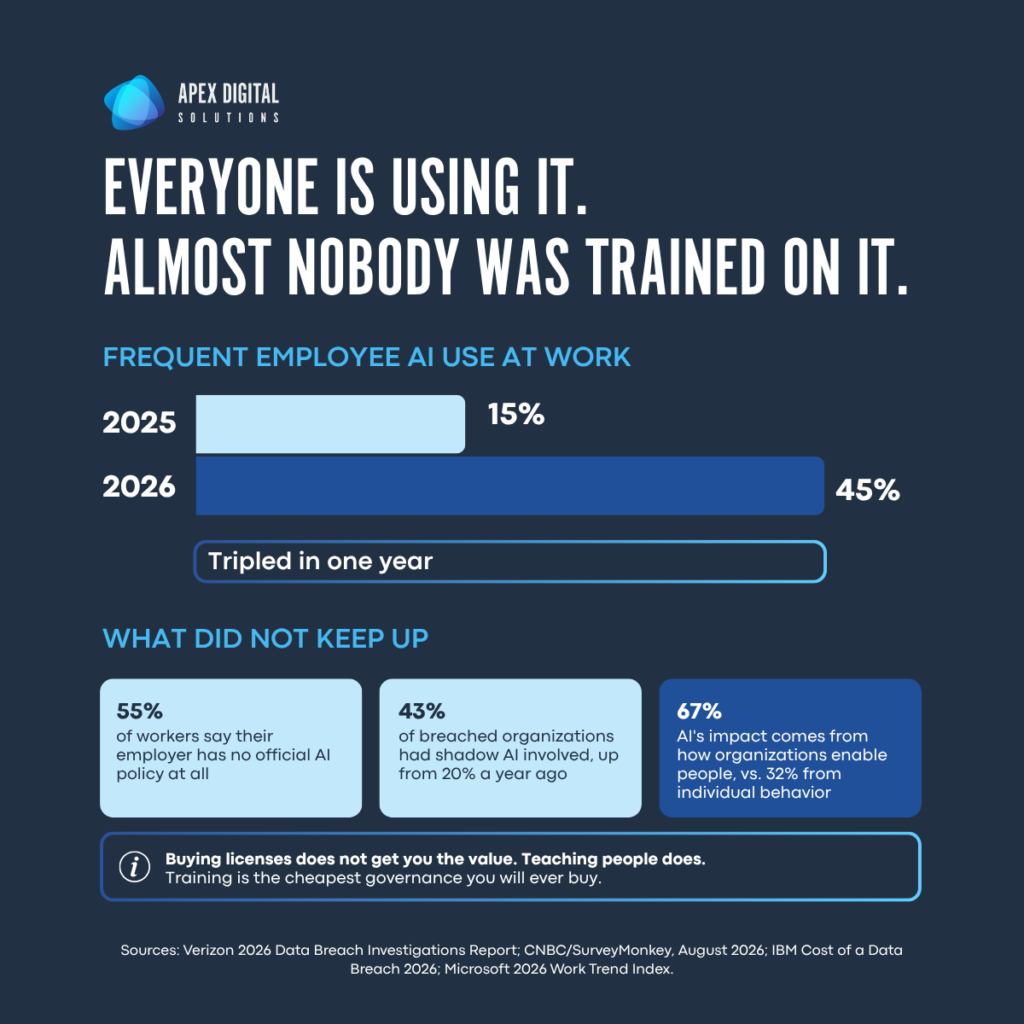
AI is already in the building. Verizon’s 2026 Data Breach Investigations Report found frequent employee use of AI tools jumped from 15% to 45% in a single year. In August, a CNBC and SurveyMonkey survey found 55% of workers say their employer has no official AI policy at all. Some people are in Copilot. Some are quietly pasting things into whatever consumer tool they found. All of them are trying to get through the day a little faster.
Adoption is not the problem. The problem is that people started using these tools well ahead of anyone telling them how, or where the edges are.
As I’ve written before, AI is a tool, not a sentient being plotting anyone’s downfall. The risk I actually worry about is ordinary. A well-meaning employee drops a client contract into a random chatbot because nobody ever told them not to. Or trusts a confident-sounding answer built on nothing. Or writes a prompt so vague the output is useless, then concludes AI does not work here.
That first one has a price now. IBM’s 2026 Cost of a Data Breach report found shadow AI involved in 43% of breaches, more than double the 20% a year earlier. More than two-thirds of the organizations surveyed had no governance process in place to limit it. The global average breach cost hit $4.99 million.
Microsoft put a number on the other side of this in its 2026 Work Trend Index. Organizational factors, meaning culture, manager support, and how people are actually enabled, account for 67% of AI’s impact. Individual mindset and behavior account for 32%. Buying licenses does not get you the value. Teaching people does.
Training is the cheapest governance you will ever buy. Teach people what to feed it, what to keep away from it, how to write a decent prompt, and how to sanity-check what comes back. One afternoon of that does more for your risk profile than most of the policies people would rather write instead. The second cheapest thing is tightening permissions before you turn anything on, which is a different job and worth doing in the right order. We wrote up that sequence in how to secure Microsoft 365 Copilot before rollout, and if your teams are starting to ask about agents specifically, when to use a Copilot agent covers where they earn their keep.
| If you’re rolling out Copilot this year, a readiness assessment answers the permissions question before it becomes an incident. Here’s how one enterprise did it, and what it turned up. |
Nobody has a real map of their environment
Ask someone to list every SaaS app in active use across their company, plus every on-prem system still running. I would be very surprised if you receive a real list, and even more so if that list is comprehensive.
Environments today grew by accretion. A tool here, a subscription there, a server that predates half the team, an app three people depend on and nobody officially owns, a renewal quietly hitting somebody’s personal card. Each decision was reasonable at the time.
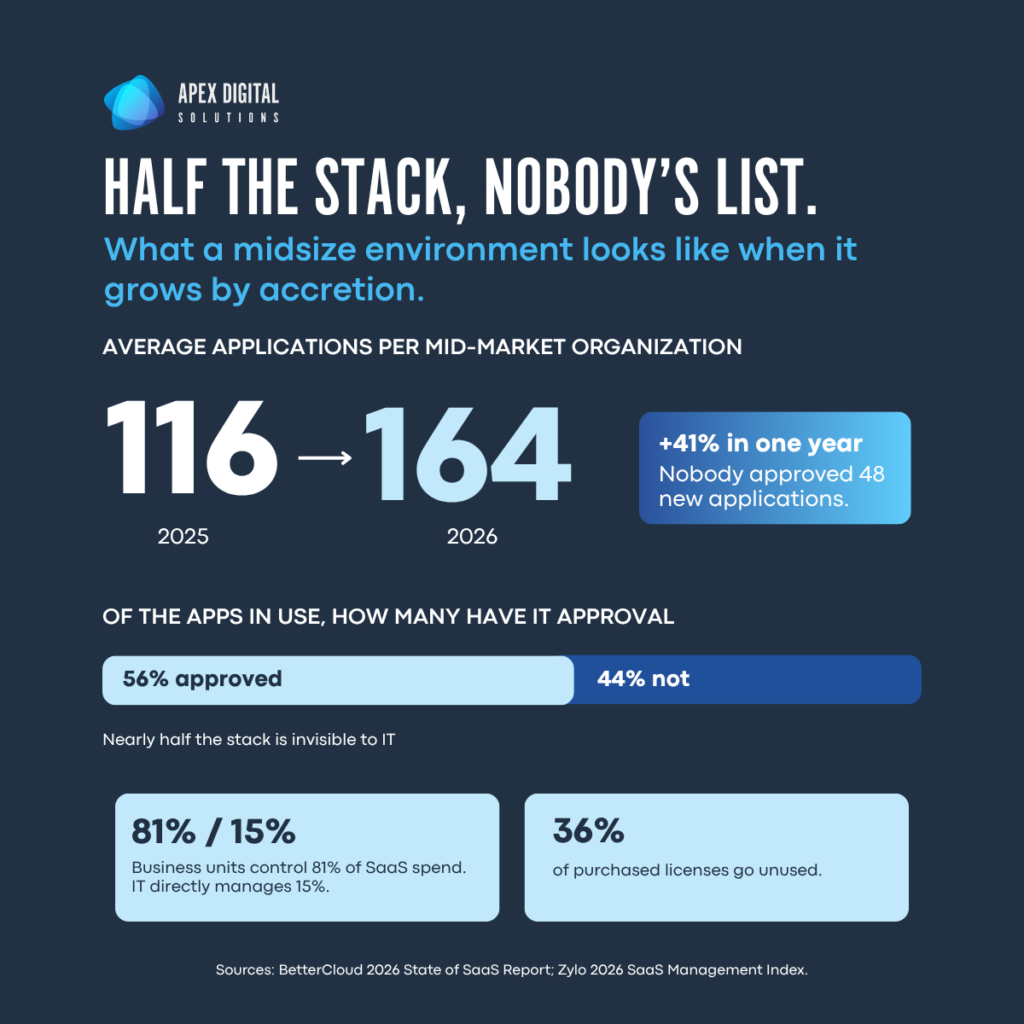
BetterCloud’s 2026 State of SaaS report found mid-market organizations went from an average of 116 applications to 164 in a single year, a 41% jump. Across all organizations in that study, only 56% of the apps in use carry IT approval.
Zylo’s 2026 index, built on more than 40 million licenses and $75 billion in tracked spend, found business units control 81% of SaaS spend while IT directly manages 15%. About 36% of purchased licenses go unused.
Then there is the security half. Arctic Wolf looked at more than 800,000 IT assets and found a third were missing at least one critical security control. Within that third, 17% of all assets were invisible to legacy vulnerability tooling, which is to say invisible to the thing whose job is finding the problem. In one environment, a company finished a large end-of-life migration, confirmed internally that it was done, and still had 8% of assets running unsupported.
You cannot govern, secure, or budget for what you cannot see. Sprawl is the fog that hides the actual risks: the unpatched system, the duplicate data, the license you are still paying for, the access that should have been revoked ages ago. Fixing it does not require a dramatic transformation program. It requires an inventory and the willingness to look honestly at what turns up. We wrote about what a year of unmanaged Microsoft 365 actually looks like and seven gaps that show up over and over, because the pattern repeats across almost every environment we walk into.
| Want to know what’s actually in yours? Start with our Microsoft 365 friction-point checklist, a 16-statement self-scorecard you can run in an afternoon. When you want the real picture, here’s what a Microsoft 365 assessment covers. |
It is the same problem three times
Pull these apart and they look unrelated. A phone system, an AI habit, a messy environment. Line them up and the common thread is drift.
Nobody chose to end up here. No one sat down and decided to run a mystery phone system, let AI loose without training, and lose track of their own software estate. It accumulated, one perfectly reasonable “we’ll deal with it later” at a time, until later became the current state.
The fix is the discipline of periodically walking the estate and asking the uncomfortable question about each thing you are still running: do we actually need this, or did we just stop asking? Whether it is a phone line, an AI tool, or a server humming away in a closet, the question does not change.
The savings you can see, and the ones you cannot
Doing this well takes a little time and a little money up front.
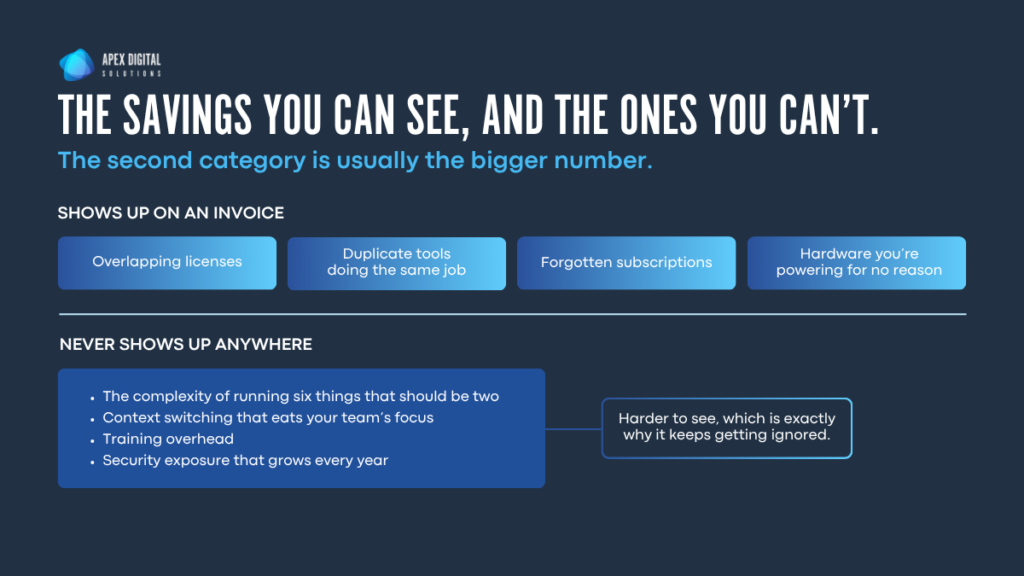
The payoff lands in two places. The explicit savings are the ones you can point to on an invoice: overlapping licenses, duplicate tools doing the same job, subscriptions nobody remembers starting, hardware you are powering for no good reason. Those add up faster than people expect. Zylo’s 36% unused-license figure is a fair place to start estimating, and if your Microsoft agreement is part of the mess, our licensing comparison guide lays the plans side by side.
The implicit savings never show up as a line item and cost you every day. The complexity of running six things that should be two. The context switching that eats your team’s focus. The training overhead. The security exposure that grows a little more every year you leave the sprawl alone.
Where to start
If any of this sounds familiar, you should begin to make a list:
- Inventory what you have. Every SaaS subscription, every server, every phone line, every AI tool anyone has expensed. Include the ones you suspect are on someone’s personal card.
- Assign an owner to each thing. Not a department. A person. Anything you cannot assign an owner to is a finding by itself.
- Ask the question. For each item: do we need this, or did we just stop asking? Write the answer down.
- Handle the three obvious ones first. The unsupported phone system, the AI tools nobody was trained on, and whatever showed up in the inventory that you did not know existed.
The organizations handling this best right now are not the ones with the boldest roadmap. They are the ones willing to take inventory, own what they find, and let the rest go.
That is what I am hearing. And it is a good sign, because you cannot fix drift until you are willing to admit you drifted.
| If you want a second set of eyes on the list, we do this for a living. Book a consultation, or if you would rather just vent about your current situation with no pitch attached, book a tech therapy call. |
Common questions
Three things come up most often: replacing phone systems that are past support, training employees who are already using AI without guidance, and building an accurate inventory of applications and assets. The inventory comes first, because the other two decisions depend on knowing what you actually have.
Environments grow by accretion, one reasonable decision at a time, until the accumulated total is something no single person can describe. BetterCloud found mid-market organizations added 48 applications in one year on average. That happens without a strategy meeting.
Tighten permissions before you expand access, then run a short practical training session on what to feed AI tools, what to keep away from them, and how to verify output. Microsoft’s 2026 Work Trend Index found organizational enablement accounts for 67% of AI’s impact, roughly twice the weight of individual behavior.
Start with expense reports and credit card statements, not the IT asset list. Zylo found business units control 81% of SaaS spend while IT directly manages 15%, so the finance data will surface applications the IT inventory never captured.
It is worth evaluating if your platform is approaching or past end of support, if your call flows depend on rules nobody can explain, or if you are already paying for Teams. The decision usually turns on what the current system costs you in maintenance, risk, and staff time rather than on the new platform’s feature list.
Scope it to one category at a time. Applications first, since that is where the spend and the shadow IT live, then assets, then integrations. Assign an owner to every item as you go. A partial inventory with owners assigned is more useful than a complete one nobody maintains.